


 SEO Manager
Updated Date:
Google Ads Click Farms: How Fake Clicks Drain Your Budget and How to Stop Them
Why Click Farms Are a Problem for Google Ads Advertisers

Google Ads can be a great way to grow your business. You set a budget, choose keywords and the clicks start coming in. But when those clicks don't turn into sales, something is wrong. One common cause is a Google Ads click farm: an operation that generates fake clicks, burning through your budget without bringing in customers.
Click farms are a big part of Google Ads click fraud. Bad actors use low-paid workers or bots to click on ads on purpose, and small businesses and agencies are frequent targets. In this post, we'll explain what click farms are, how they hurt your campaigns and the simple steps you can take to fight back, so you can protect your ad spend and get real results from Google Ads.
What Is a Google Ads Click Farm?
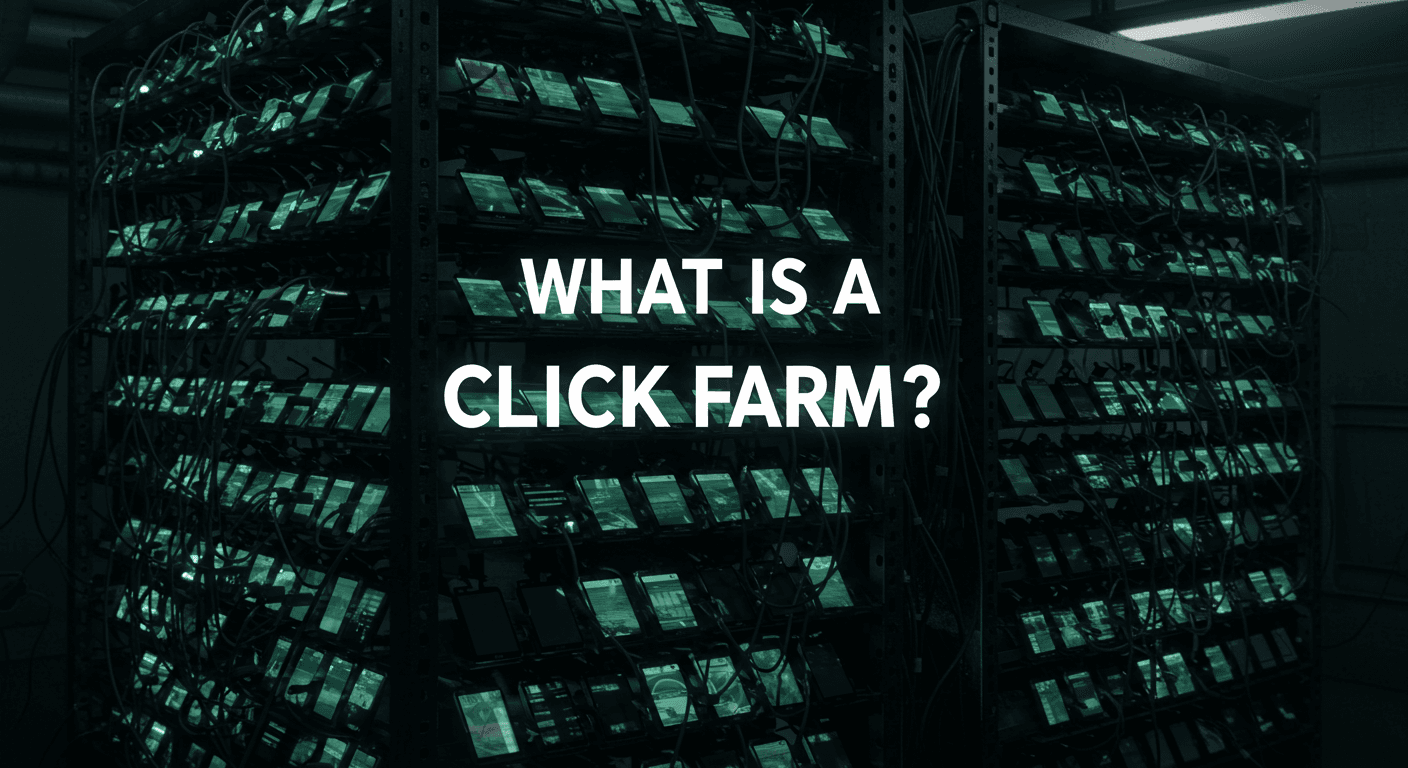
A click farm is a group of people or devices paid to generate fake clicks on ads. Picture rows of workers with dozens of low-cost phones or computers, scrolling search results, tapping ads and repeating it all day long. No purchases, just clicks.
Why do it? Bad actors, often your competitors, pay click farms a small fee per click to drain your budget. The click costs them very little, but Google still charges you your full cost per click, so you lose real money for nothing.
Bots make it worse. Automated software imitates human behavior and rotates IP addresses through VPNs and proxies to avoid detection. The scale is significant: Juniper Research estimated that ad fraud cost advertisers $84 billion in 2023, and every fake click on your campaigns adds to your share of that loss.
Example: Imagine a local shoe store running ads for running shoes. Clicks climb every week, but sales barely move. A closer look shows bursts of clicks from the same few sources at odd hours, a typical sign of a click farm hired by a rival. Once those sources are blocked, the budget starts reaching real shoppers again.
How Click Farms Target Your Google Ads

Click fraud bots and click farms go after easy targets. They look for Google Ads accounts bidding on:
➔ New campaigns with fresh budgets.
➔ Competitive niches such as e-commerce, legal services or insurance.
➔ High-CPC keywords like "best lawyers near me."
Workers and scripts imitate real searches. They might type "buy iPhone online," click your ad and leave within seconds. Because the activity looks like a normal search, Google's filters don't always catch it.
Common tricks:
| IP Rotation | Proxies and VPNs make clicks appear to come from many different locations. |
| Phone Racks and Emulators | Rows of real phones or Android emulators generate clicks that look like they come from separate users. |
| Timing Attacks | Clicks are concentrated outside business hours, when you're less likely to be watching. |
Red flag: Your dashboard shows a burst of overnight clicks from a country you don't sell to, and the sessions end within seconds. That's a typical click farm pattern.
Signs Your Budget Is Bleeding from Click Farms

Don't wait until your budget runs dry. Watch for these red flags in Google Ads:
➔ Sudden click spikes: Clicks jump without any change to your campaigns.
➔ High bounce from certain sources: Some placements or locations send visitors who leave immediately.
➔ Low engagement: Sessions last only a few seconds and no other pages are viewed.
➔ Unrelated countries: Clicks come from regions you don't target or serve.
➔ Early budget burn: Your daily budget runs out much earlier than usual.
➔ Same IP patterns: Repeated clicks from the same IP addresses or ranges.
Use Google Analytics to filter out non-converting traffic and spot patterns. Google Analytics doesn't show IP addresses, so use a click fraud protection tool to see them. Also add the "Invalid clicks" and "Invalid click rate" columns in Google Ads; if the rate suddenly rises, investigate further.
Why Click Farms Hurt More Than You Think

Fake clicks do more than waste money. They:
➔ Corrupt your conversion data, so Smart Bidding optimizes toward the wrong traffic.
➔ Distort A/B tests and audience targeting.
➔ Burn through budgets, so campaigns stop early in the day.
➔ Demoralize teams and erode trust in the ad platform.
Example: Imagine an agency whose client's budget is quietly drained by a click farm month after month. Results fall, the client loses confidence and the account is at risk. Prevention stops that cycle before it starts, and this is exactly why agencies make click fraud protection part of every account.
Step-by-Step Guide to Stop Click Farms Now

The good news is that you can fight back right away, no technical degree needed.
Lock Down Your Targeting
➔ Use exact match keywords for your most important terms (e.g., [running shoes] instead of broad match running shoes).
➔ Add negative keywords such as "free," "cheap" or "jobs."
➔ Target only the locations you actually serve, and exclude the rest.
➔ Use ad scheduling to run ads mainly during the hours your customers are active.
These steps alone cut out a lot of low-quality and fake traffic.
Use Google Ads' Built-In Protections
➔ Add suspicious IP addresses to your IP exclusions (up to 500 per campaign).
➔ Add the "Invalid clicks" columns to your reports to see what Google has already filtered.
➔ If you find invalid clicks Google missed, submit an investigation request through Google's invalid click form.
➔ Set up automated rules to pause ads or campaigns when performance suddenly drops.
Add Fraud Detection Tools
Platform tools only go so far. A dedicated fraud detection tool adds an extra layer:
➔ ClickSambo: Automatically blocks click farm and bot traffic on Google Ads and Meta Ads using device fingerprinting, VPN/proxy detection and behavioral AI, and provides an invalid clicks report to support refund requests.
➔ TrafficGuard: Ad fraud prevention across PPC, app and affiliate campaigns.
➔ CHEQ: Go-to-market security platform aimed at larger companies.
➔ Fraud Blocker: Click fraud detection and blocking for Google and Meta Ads.
Click farms often work alongside bots that hit your website directly. Learn more in our guide on why your website needs bot traffic filtering.
Monitor and Test Constantly
➔ Connect Google Ads to Google Analytics for a complete view of each visit.
➔ Set up alerts for sudden click spikes; ClickSambo, for example, sends mobile and email notifications when it detects an attack.
➔ Test changes: after blocking suspicious sources, check whether click volume drops and lead quality improves.
➔ Track every valuable action, not just sales, including form fills and phone calls.
Example: Imagine a marketer who combines tighter targeting, IP exclusions and a fraud detection tool. Within weeks, repeated clicks from the same sources stop, and the leads coming in are from real customers again.
Boost Real Traffic After Cleanup
Click farms blocked? Now optimize for real people:
➔ Make your landing pages load fast.
➔ Make sure your landing page delivers exactly what your ad promises.
➔ Add trust signals like reviews and secure checkout.
➔ Retarget real visitors with relevant offers.
➔ Add an SEO strategy for steady organic traffic.
Final Thoughts: Recapture Your Google Ads Budget
Google Ads click farms quietly drain budgets, but you're not powerless. Spot the warning signs early, tighten your targeting, use the right tools and monitor your account regularly. You'll stop wasting money and turn more clicks into customers. Calculate your wasted ad spend today. ClickSambo helps businesses tell real people from fake clicks and block the fakes automatically. Start your free trial, or follow us on LinkedIn for the latest updates.
Click farms drain budgets quietly. With ClickSambo, one agency cut bot attacks by 68%, grew its client's high-value leads about 8x and secured a refund from Google
 See the Growth Story
Frequently asked questions
A Google Ads click farm is a group of low-paid workers or automated systems that click on your ads with no intention of buying. These clicks drain your budget, often on behalf of a competitor. Click farms imitate real searches from many devices and locations to avoid detection, so your dashboard shows high click-through rates but few or no sales.
Watch for sudden click spikes from locations you don't serve, sessions that end within seconds, repeated clicks from the same IP addresses and a daily budget that runs out unusually early, while sales stay flat. Add the "Invalid clicks" columns in Google Ads and use Google Analytics to find non-converting patterns. Since Google Analytics doesn't show IP addresses, a click fraud protection tool helps you see exactly where the fake clicks come from.
Start by tightening your targeting with exact match keywords, negative keyword lists and location exclusions for areas you don't serve. Add suspicious IP addresses to your Google Ads IP exclusions. Then add a dedicated tool like ClickSambo, which blocks fraudulent clicks automatically, sends mobile and email alerts when an attack starts and gives you an invalid clicks report to support refund requests to Google.




 Other
Other