
Updated Date:
You can find the unique tracking codes for any of your domains by following these simple steps within your ClickSambo dashboard.
Log In: Sign in to your ClickSambo account.
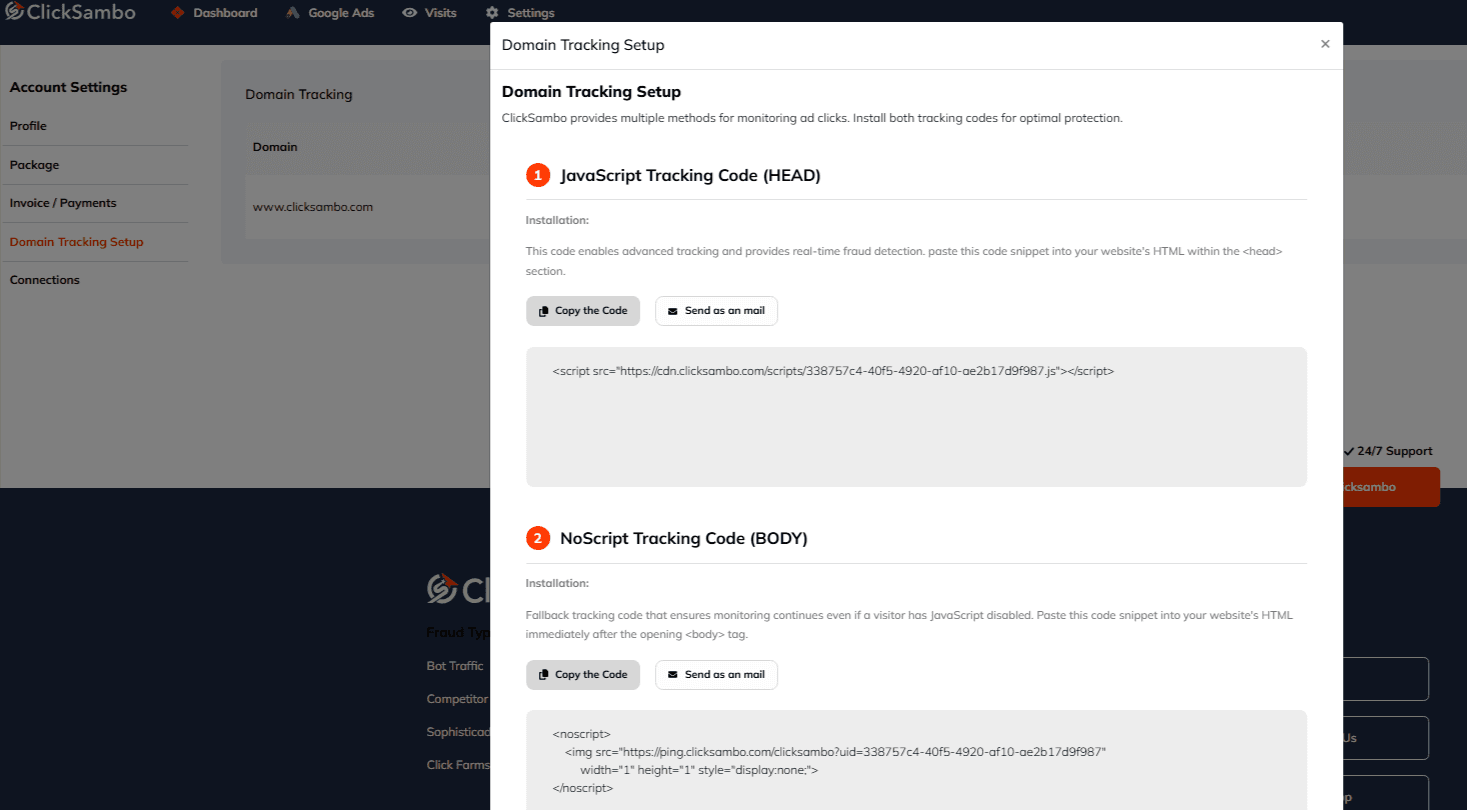
Navigate Settings-->Account Settings From the main menu on the left, go to: Account Settings > Domain Tracking Setup.
Select Your Domain: You will see a list of your registered websites. Find the domain you need and click the Detail button next to it.
Copy Your Codes: A pop-up window will appear. In this window, locate the "Install Tracking Code" section. You will find two separate code snippets.
JavaScript Tracking Code (HEAD): This code enables advanced tracking and provides real-time fraud detection. For the most accurate and immediate results, paste this code snippet into your website's HTML within the <head> section.
NoScript Tracking Code (BODY): This is a fallback tracking code that ensures monitoring continues even if a visitor has JavaScript disabled. Paste this code snippet into your website's HTML immediately after the opening <body> tag.


Protect your marketing budget and increase revenue with ClickSambo
Start Trial
Analyze your account and uncover losses caused by fake clicks.
Get Free Report
Reach us easily via WhatsApp, live chat, or email.
Contact Us
Join our partner program and turn ad-fraud protection into a scalable, recurring revenue stream.

 Other Advertisement Analytics Performance


