
Updated Date:
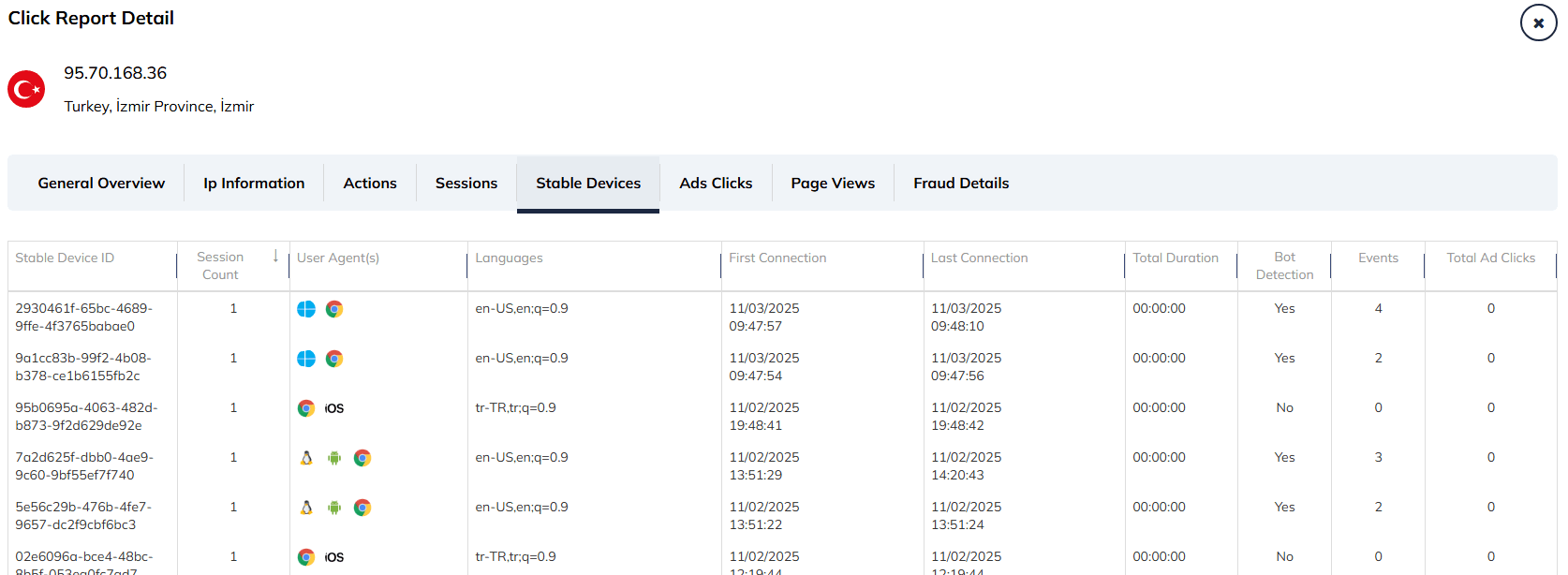
In the world of digital advertising, users often try to hide their identity by clearing cookies, changing browsers, or rotating IP addresses.
A Stable Device ID creates a persistent digital fingerprint based on the user's hardware and system configuration (screen resolution, OS, fonts, etc.). This identifier remains constant even if the user attempts to mask their identity. This allows ClickSambo to recognize that the same physical device is returning to your site, even if it appears to be a "new" visitor.
A "Stable Device ID" is exactly what it sounds like: a unique identifier for a device that remains the same over a long period. This is the goal of fingerprinting. The "Stable Device ID" is the result of the fingerprinting process.
| Stable Device ID | A unique, persistent alphanumeric hash (e.g., 2930461f-65bc...) that identifies the specific hardware. |
| Session Count | The number of distinct sessions initiated by this specific device |
| User Agent(s) | Visual icons representing the Operating System (e.g., Windows, Linux, iOS, Android) and Browser (e.g., Chrome) used by the device |
| Languages | The language preferences configured in the browser (e.g., en-US for English users, tr-TR for Turkish users). |
| First Connection | When this device was first seen. |
| Last Connection | The most recent activity timestamp. |
| Total Duration | How long the device stayed active on the site (e.g., 00:00:00). |
| Bot Detection | A clear Yes or No status indicating if ClickSambo's algorithms classified this specific device fingerprint as automated. |
| Events | Total on-site interactions recorded (e.g., 4, 3). |
| Total Ad Clicks | The number of ad clicks generated specifically by this device. |
| Detect IP Rotation | Identify a single malicious user cycling through different IPs. |
| Unmask Fraud | Link multiple fraudulent clicks back to one unique source, even if they try to hide behind different browsers or VPNs. |


Protect your marketing budget and increase revenue with ClickSambo
Start Trial
Analyze your account and uncover losses caused by fake clicks.
Get Free Report
Reach us easily via WhatsApp, live chat, or email.
Contact Us
Join our partner program and turn ad-fraud protection into a scalable, recurring revenue stream.

 Other Advertisement Analytics Performance


