
Updated Date:
The Ads Clicks tab provides a detailed log of every ad click attributed to the IP address you are investigating. This view is essential for connecting suspicious on-site behavior directly back to your advertising spend.
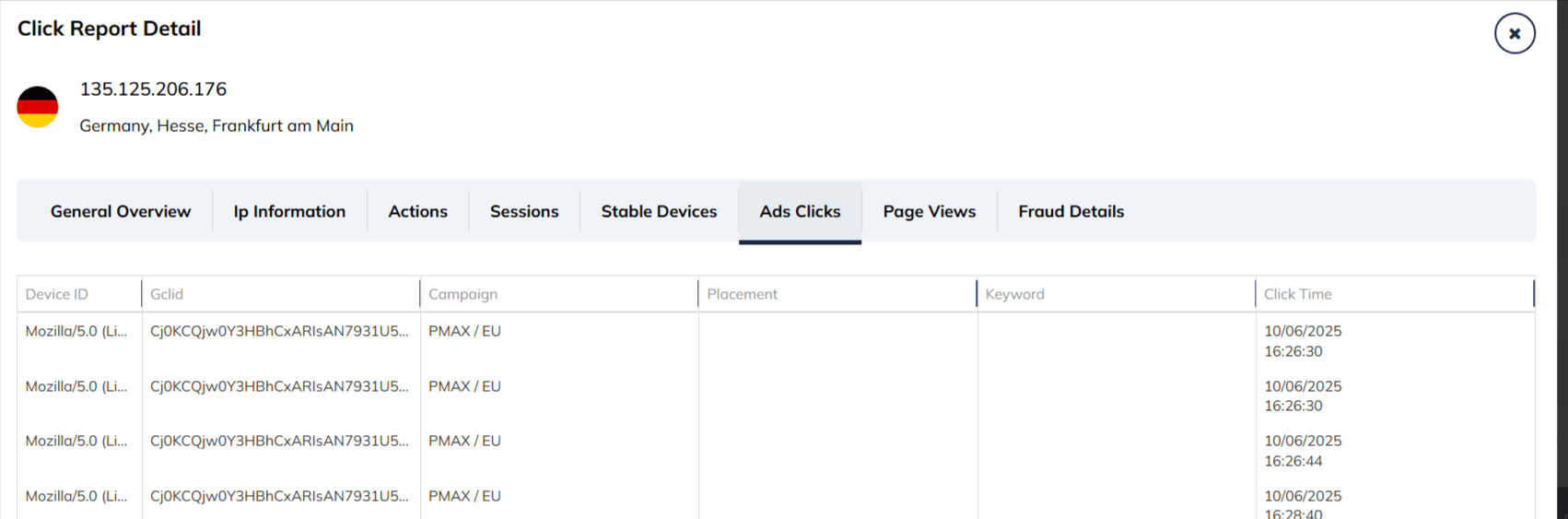
Each entry in the log provides precise details about the click's origin and context based on the columns shown in your report:
| Device ID | The identifier associated with the device that generated the click (e.g., Mozilla/5.0...). |
| Gclid | The unique Google Click Identifier string used to track specific ad events. This is crucial for matching clicks to your Google Ads reports (e.g., Cj0KCQjw0...). |
| Campaign | The specific Google Ads campaign name that triggered the click (e.g., PMAX / EU). |
| Placement | The specific website, app, or YouTube channel where the ad was displayed (for Display or Video campaigns). |
| Keyword | The specific search term that matched the user's query (for Search campaigns). |
| Click Time | The precise date and timestamp when the ad click occurred (e.g., 10/06/2025 16:26:30). |
| Feature | Primary Focus | Key Outcome |
| Attribute Fraud | Links suspicious IP activity directly to specific campaigns and Gclids. | Allows you to trace malicious behavior back to the exact entry point. |
| Identify Placement Fraud | Pinpoints specific websites or apps in the Display Network sending invalid traffic. | Enables you to exclude low-quality placements and save your display budget. |
| Compile Evidence | Gathers critical data such as Gclids and Click Timestamps. | Provides the necessary documentation to request refunds from ad platforms. |


Protect your marketing budget and increase revenue with ClickSambo
Start Trial
Analyze your account and uncover losses caused by fake clicks.
Get Free Report
Reach us easily via WhatsApp, live chat, or email.
Contact Us
Join our partner program and turn ad-fraud protection into a scalable, recurring revenue stream.

 Other Advertisement Analytics Performance


