
Updated Date:
The Sessions tab allows you to analyze specific device fingerprints and browser sessions linked to an IP address. It helps you trace activity back to a single source, even if the user changes their IP address.
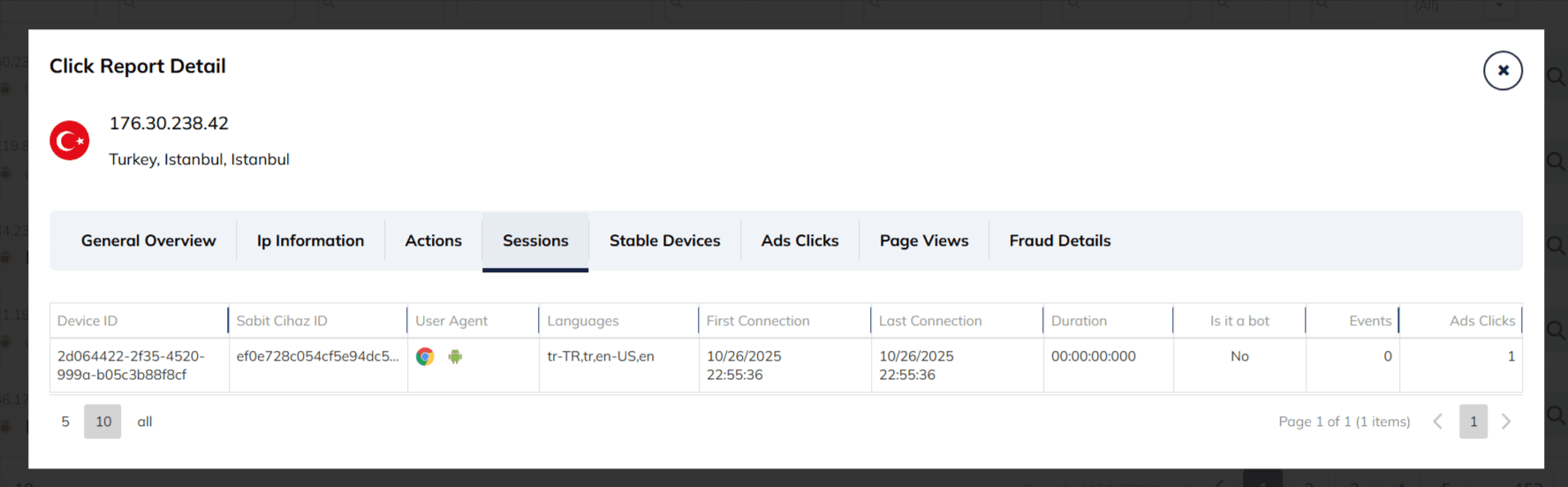
| Device ID | A unique alphanumeric fingerprint generated for that specific browser session (e.g., 2d064422...). |
| Sabit Cihaz ID (Fixed Device ID) | A persistent identifier used to track the same device across different sessions or IP rotations. |
| User Agent | Visual icons representing the browser and operating system used by the visitor (e.g., Chrome logo and Android logo). |
| Languages | The language preferences configured in the user's browser settings (e.g., tr-TR,tr,en-US,en). |
| First Connection | The timestamp when the session started. |
| Last Connection | The timestamp of the most recent activity. |
| Duration | The total time elapsed during the session (e.g., 00:00:00:000). |
| Is it a bot | A simple "Yes" or "No" status based on our automated analysis. |
| Events | The total number of on-site interactions recorded. |
| Ads Clicks | The number of ad clicks attributed to this specific session. |
Its primary purpose is to confirm if a single malicious user or bot is behind suspicious activity, especially in cases of:
IP Rotation: Detecting a single device that is cycling through different IP addresses.
Device-Level Patterns: Linking multiple fraudulent clicks or events back to one unique Device ID.


Protect your marketing budget and increase revenue with ClickSambo
Start Trial
Analyze your account and uncover losses caused by fake clicks.
Get Free Report
Reach us easily via WhatsApp, live chat, or email.
Contact Us
Join our partner program and turn ad-fraud protection into a scalable, recurring revenue stream.

 Other Advertisement Analytics Performance


