
Updated Date:
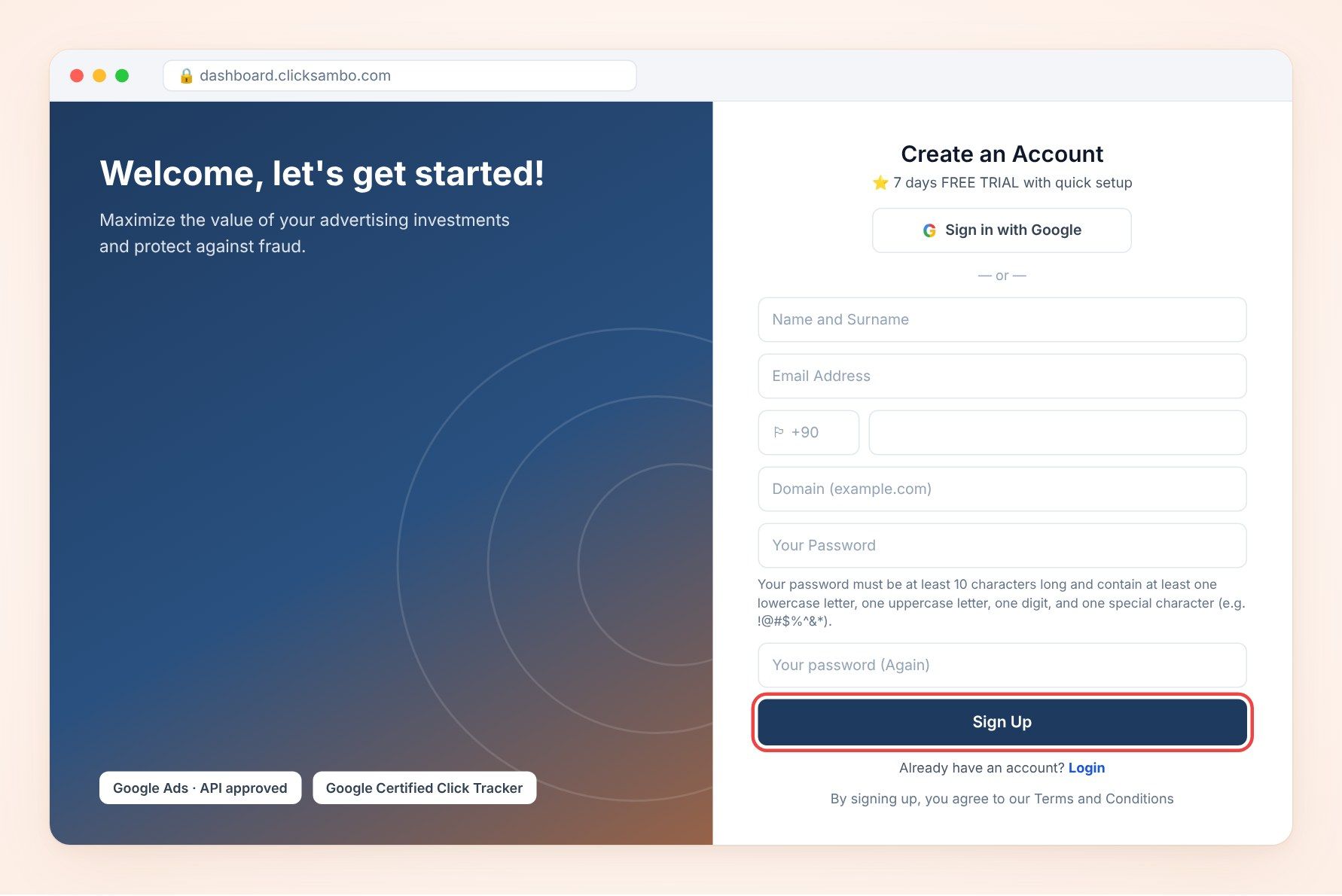
1. Go to the registration page: On the ClickSambo website, click Try Demo to open the Create an Account page.
2. Fill in your details in the Create an Account form:
| Name and Surname | Enter your full name. |
| Email Address | Enter a valid email address you can access. |
| Phone number | Select your country code (e.g., +90) from the drop-down menu and enter your phone number. |
| Domain (example.com) | Enter the main address of the website you want to protect (e.g., example.com). |
| Your Password | Create a secure password. |
| Your password (Again) | Re-enter the same password to confirm it. |
Password rules: At least 10 characters, including at least one lowercase letter, one uppercase letter, one digit and one special character (e.g., !@#$%^&*).
3. Complete registration: Once all fields are filled in correctly, click the dark blue Sign Up button at the bottom of the form.
Check your inbox (and your spam/junk folder) for a verification email from ClickSambo. Follow the instructions in that email to activate your account and access the dashboard.


Protect your marketing budget and increase revenue with ClickSambo
Start Trial
Analyze your account and uncover losses caused by fake clicks.
Get Free Report
Reach us easily via WhatsApp, live chat, or email.
Contact Us
Join our partner program and turn ad-fraud protection into a scalable, recurring revenue stream.

 Other Advertisement Analytics Performance


