
Updated Date:
If you have a tracking template defined at the Campaign or Ad Group level, Google will ignore your Account-level template entirely for that section of your account.
| Level | Priority | Behavior |
| Keyword / Ad Level (Strongest) | ⭐⭐⭐⭐ | Strongest: Overrides everything else. |
| Ad Group Level | ⭐⭐⭐ | Overrides Campaign and Account. |
| Campaign Level | ⭐⭐ | Overrides Account level. |
| Account Level (Broadest) | ⭐ | Broadest: Applies if no other template exists. |
However, if you (or a previous agency) manually added a tracking template to a specific Campaign or Ad Group in the past, Google Ads will use that template and block ClickSambo for those specific ads.
Warning: If a lower-level template exists, ClickSambo cannot see or protect that traffic.
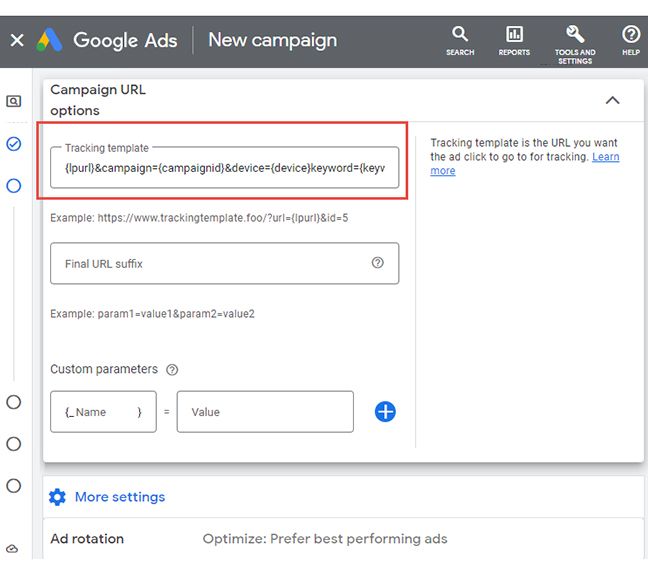
Navigate to the campaign or ad group in question in Google Ads.
Go to Settings -> Campaign URL Options.
Check if there is text in the "Tracking Template" box.
Action: If you see a template there that isn't ClickSambo's, remove it so the campaign effectively "inherits" the correct template from the Account Level.


Protect your marketing budget and increase revenue with ClickSambo
Start Trial
Analyze your account and uncover losses caused by fake clicks.
Get Free Report
Reach us easily via WhatsApp, live chat, or email.
Contact Us
Join our partner program and turn ad-fraud protection into a scalable, recurring revenue stream.

 Other Advertisement Analytics Performance


