
Updated Date:
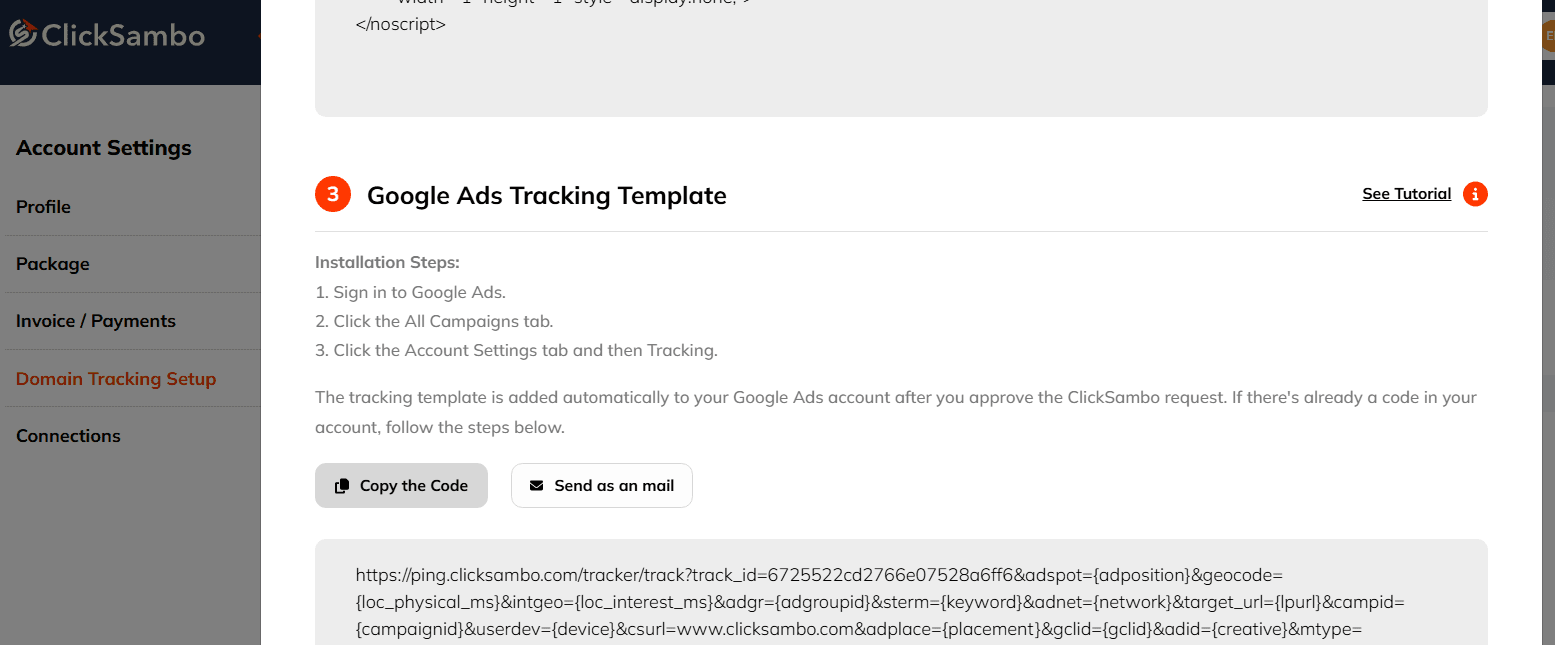
Here’s exactly where to find it in your account.
Follow these steps: 📋
Log in to your ClickSambo account.
From the main navigation menu, go to Account Settings.
Within the settings menu, select Domain Tracking Setup.
You will see a list of your website domains. Find the domain you are setting up and click the Detail button next to it.
A pop-up window will appear. Find the section labeled Tracking Template.
The URL provided in this section is your complete tracking template.
Next Step: Copy this entire URL. You will need to paste it into the "Tracking template" field within your Google Ads account settings (at the account, campaign, or ad group level).


Protect your marketing budget and increase revenue with ClickSambo
Start Trial
Analyze your account and uncover losses caused by fake clicks.
Get Free Report
Reach us easily via WhatsApp, live chat, or email.
Contact Us
Join our partner program and turn ad-fraud protection into a scalable, recurring revenue stream.

 Other Advertisement Analytics Performance


