
Updated Date:
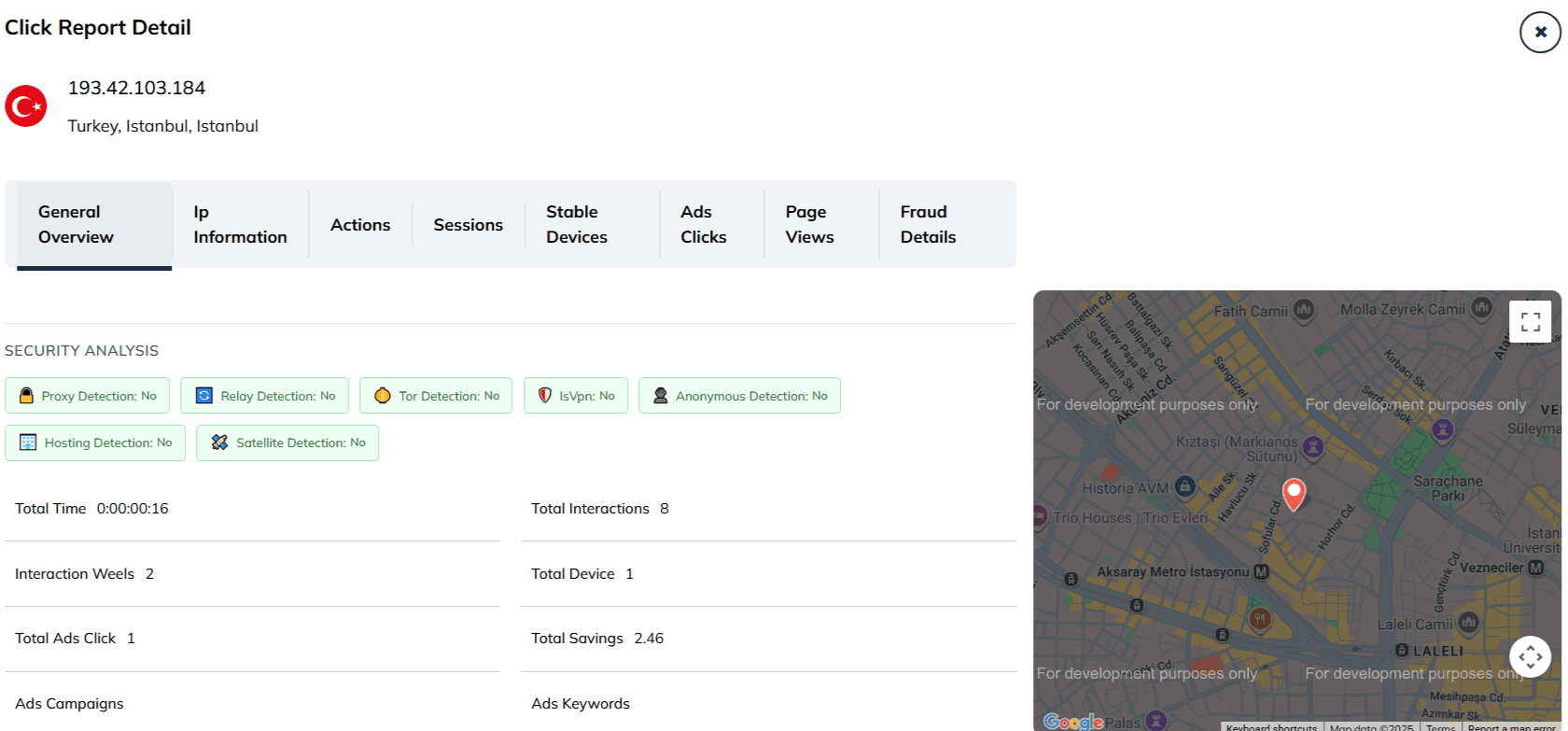
The General Overview tab is the first screen you'll see, designed to provide a quick and powerful summary of that IP's entire history and threat assessment.
At the very top of the window, you'll see the IP address you are investigating, along with its detected Location (Country, Province, City). On the right, a Geographical Map pinpoints this approximate location.
The General Overview tab provides a forensic breakdown of the specific IP address, combining security checks with on-site behavioral metrics.
Security Analysis (Threat Indicators)
This top section displays a series of badges that verify if the visitor is using technologies often associated with fraud. A "No" (Green) status indicates clean traffic.
| Proxy / Relay / Tor Detection | Checks if the user is routing their connection through anonymizing services to hide their true identity. |
| IsVpn | Specifically flags if the IP belongs to a Virtual Private Network provider. |
| Hosting / Satellite / Anonymous | Identifies if the traffic originates from a data center (server) or a satellite connection rather than a standard residential or mobile ISP. |
Engagement & Behavioral Metrics
These numbers help you determine if the visitor acted like a human.
| Total Time | The exact duration the visitor spent on your site (e.g., 0:00:00:16). Extremely short times often indicate bot behavior. |
| Interaction Weels | Tracks mouse wheel scrolls or touch-screen scrolling events. A value greater than zero is a strong positive signal of human engagement. |
| Total Interactions | Identifies if the traffic originates from a data center (server) or a satellite connection rather than a standard residential or mobile ISP. |
| Total Device | The number of unique devices detected associated with this IP address. |
Advertising Data & Savings
| Total Ads Click | The number of ad clicks recorded from this IP. |
| Total Savings | The estimated budget saved by blocking this specific IP, calculated based on your average CPC. |
| Ads Campaigns | Lists the specific ad campaigns this IP interacted with. |
| Ads Keywords | Displays the search terms (keywords) the user typed to find your ad. |
Use this screen for a fast assessment. A "High" Threat Level, a true value for Is VPN?, and a high number of Total Ads Clicks from an irrelevant location are all strong red flags.
Look for signs of non-human activity. A Total Time Spent of only a few seconds, combined with zero Interaction Wheels / Scrolling across multiple clicks, can indicate bot behavior.
This overview is your launchpad. If you see something suspicious, use the other tabs like Actions or Sessions to dig deeper into the specific details of the visitor's journey.


Protect your marketing budget and increase revenue with ClickSambo
Start Trial
Analyze your account and uncover losses caused by fake clicks.
Get Free Report
Reach us easily via WhatsApp, live chat, or email.
Contact Us
Join our partner program and turn ad-fraud protection into a scalable, recurring revenue stream.

 Other Advertisement Analytics Performance


