
Updated Date:
When you navigate to the Google Ads section within your ClickSambo dashboard and select the "Ad Clicks" tab, you'll find a comprehensive table presenting granular information about every click on your Google Ads that ClickSambo has processed. This detailed view is an indispensable tool for in-depth investigation into potential fraudulent activities affecting your ad spend.
The "Ad Clicks" table provides a click-by-click breakdown of traffic originating from your Google Ads campaigns. It allows you to examine individual click characteristics, identify suspicious patterns, and gain valuable insights into the quality of your ad traffic.
Export Button: Allows you to download the current table data into a file (e.g., CSV) for external analysis, custom reporting, or archival purposes.
Search Bar: A universal search bar enables you to quickly find specific entries by typing keywords or values, searching across all visible columns simultaneously.
Column Headers: Each column header is interactive:
Clicking a header allows you to sort the data in ascending or descending order based on that column's values.
A small search box below each header provides granular filtering capabilities, enabling you to narrow down displayed results by specific criteria within that column.
Pagination: Control how many entries are displayed per page (e.g., "5," "10," "All") and navigate seamlessly through multiple pages of your click data.
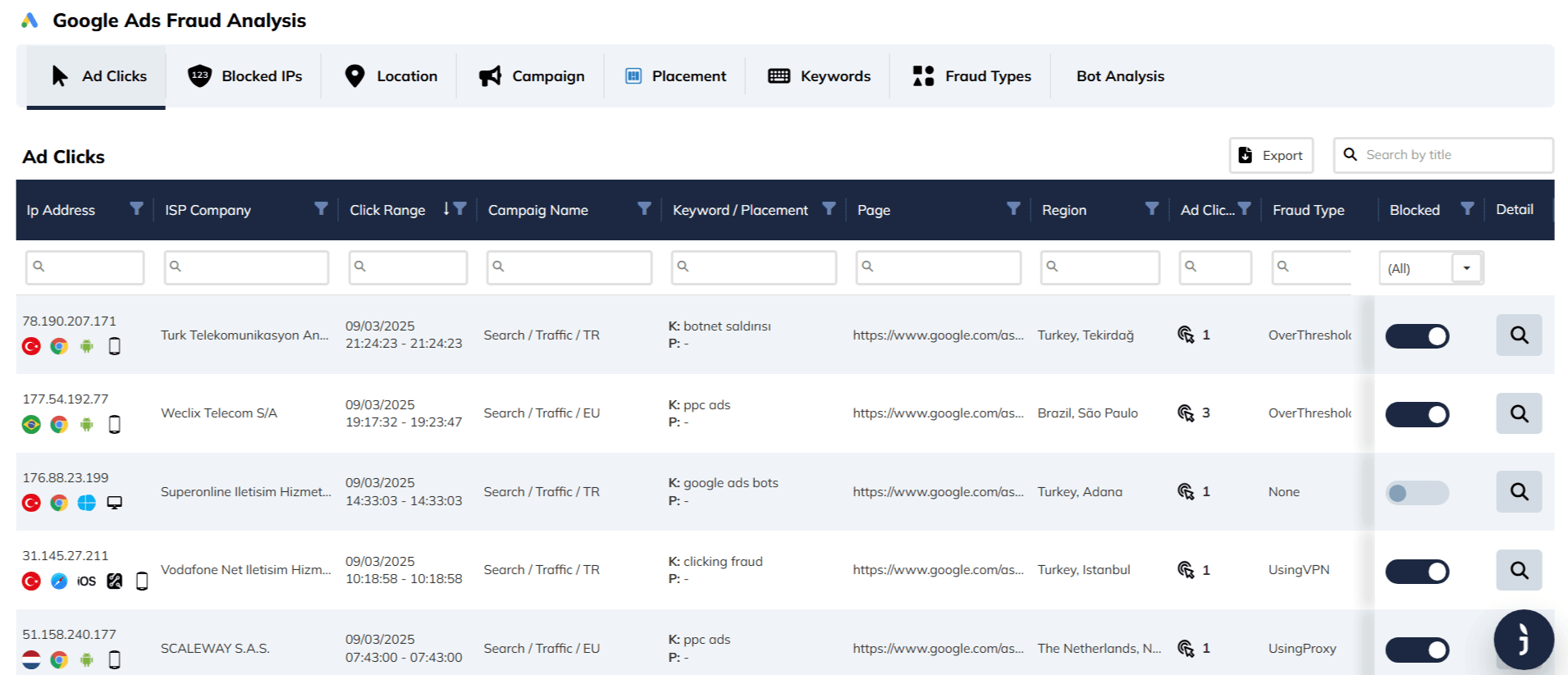
| IP Address | The unique numerical label of the device (e.g., 78.190.207.171). |
| Country Flag | Indicates the geographical origin (e.g., Turkey, Brazil, Netherlands). |
| Browser Icon | Shows the web browser used (e.g., Chrome, Edge/Explorer). |
| OS Icon | Represents the operating system (e.g., Android, Windows, iOS). |
| Device Icon | Visually distinguishes the hardware type (e.g., a Smartphone icon for mobile, a Monitor icon for desktop). |
| ISP Company | The internet service provider associated with the IP (e.g., "Turk Telekomunikasyon," "Vodafone Net Iletisim"). |
| Click Range | The specific date and timestamp of the click event (e.g., 09/03/2025 21:24:23). |
| Campaign Name | The specific Google Ads campaign that was clicked (e.g., "Search / Traffic / TR" or "Search / Traffic / EU"). |
| Keyword / Placement | Identifies exactly what triggered the ad: "K:" (Keyword): The search term used by the visitor (e.g., "P:" (Placement): The specific website URL where the ad appeared (if applicable). |
| Page | The landing page URL where the user was directed (e.g., https://www.google.com/as...). |
| Region | The specific city and country of the visitor (e.g., "Turkey, Tekirdağ", "Brazil, São Paulo"). |
| Ad Clicks | A count icon (mouse cursor) showing the total number of clicks received from this specific IP within the selected range (e.g., "1", "3"). |
| Fraud Type | The specific classification of the threat detected by ClickSambo. |
| Examples seen in your dashboard: | (Click Spam), "UsingVPN" (Masked Location), "UsingProxy," or "None" (Clean Traffic). |
| Blocked | A toggle switch allowing you to manually block or unblock the IP address instantly. Blue Toggle: The IP is currently Blocked. Grey Toggle: The IP is allowed. |
| Detail | The Magnifying Glass button. Clicking this opens a detailed view for forensic analysis of that specific click event. |


Protect your marketing budget and increase revenue with ClickSambo
Start Trial
Analyze your account and uncover losses caused by fake clicks.
Get Free Report
Reach us easily via WhatsApp, live chat, or email.
Contact Us
Join our partner program and turn ad-fraud protection into a scalable, recurring revenue stream.

 Other Advertisement Analytics Performance


