
Updated Date:
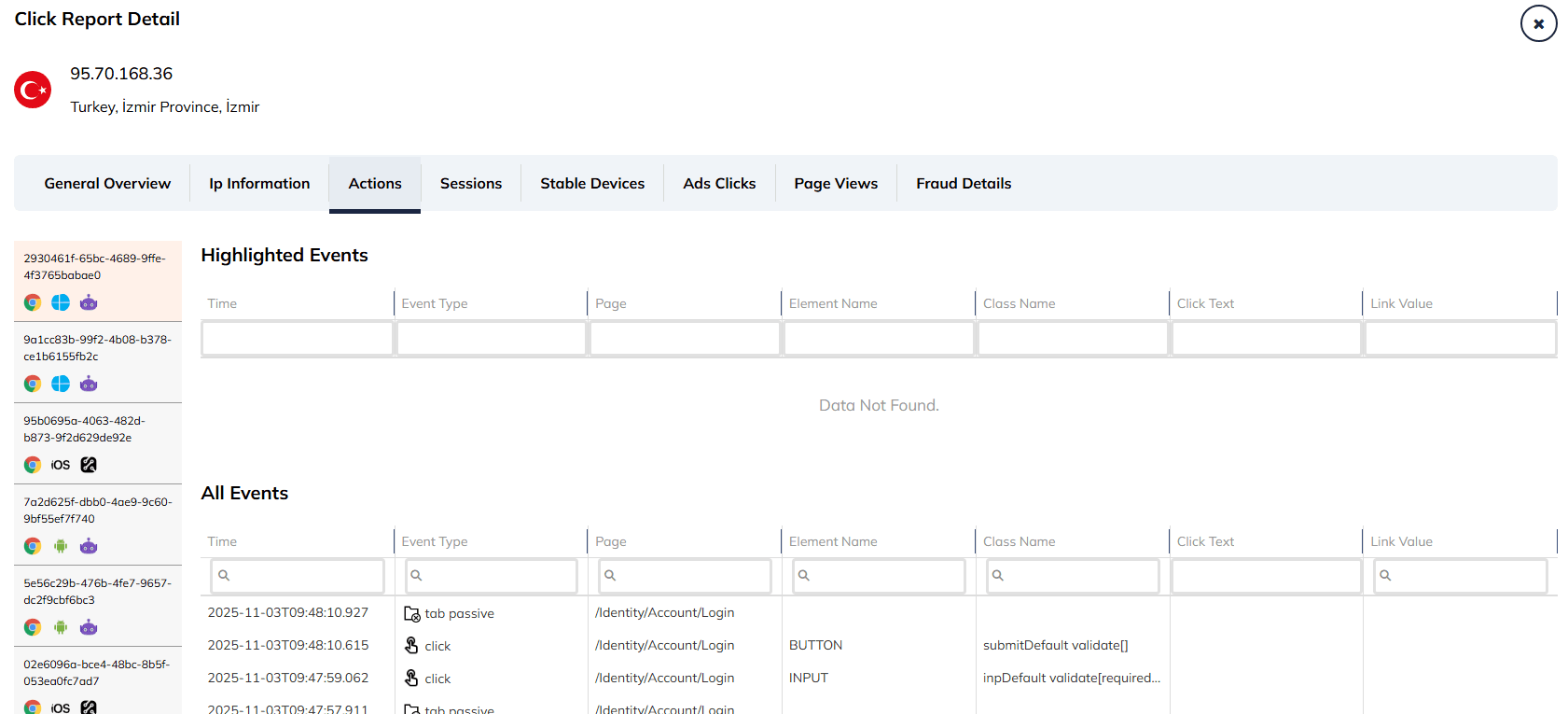
This allows for a precise analysis of their journey, determining if their behavior is human (logical) or robotic (illogical).
Clicking on a specific ID allows you to filter the event log to just that specific session. Icons indicate the OS (e.g., Android, Windows) and browser used.
The main interface is divided into two sections to help you prioritize your analysis:
Highlighted Events: This top section isolates actions that are noteworthy or potentially important.
All Events: This bottom section provides a complete, unfiltered log of every single action taken during the session.
| Time | The exact timestamp of the action down to the millisecond (e.g., 2025-11-03T09:48:10.927). |
| Event Type | The nature of the interaction. Common examples include click (mouse clicks) or tab passive (switching tabs). |
| Page | The specific URL path where the event occurred (e.g., /Identity/Account/Login). |
| Element Name | The HTML tag of the element the user interacted with (e.g., BUTTON, INPUT). |
| Class Name | The CSS class of the element, which helps identify exactly which button or form field was touched (e.g., submitDefault validate[]). |
| Click Text & Link Value | These columns capture the visible text clicked by the user or the destination URL of a link, providing context to their navigation choices. |


Protect your marketing budget and increase revenue with ClickSambo
Start Trial
Analyze your account and uncover losses caused by fake clicks.
Get Free Report
Reach us easily via WhatsApp, live chat, or email.
Contact Us
Join our partner program and turn ad-fraud protection into a scalable, recurring revenue stream.

 Other Advertisement Analytics Performance


