
Updated Date:
This guide explains how to reset your password, change your phone number and update your email address.

Log in to your ClickSambo account, open Account Settings from the account menu and select the Profile tab.
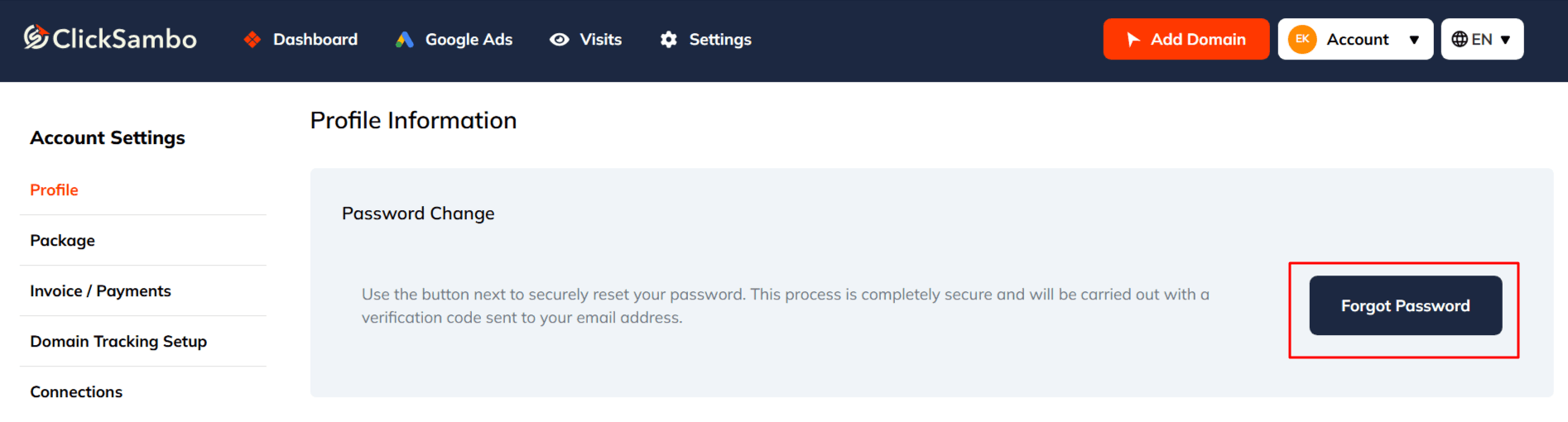
On the Profile Information page, go to the Password Change section and click Forgot Password.
A Password Reset window opens. Confirm your masked email address and click Send Code.
Check your inbox for the email containing your secure reset code.
Return to the website and enter the Verification Code.
Once the code is verified, enter and confirm your New Password.
Click the final button (e.g., Save Password) to complete the process.
For your account's security, phone number changes are handled by our support team.
To change the phone number on your account, email your request to [email protected].
For a quick and secure update, please send the request from the email address registered to your ClickSambo account.

Find the Update Email Address section.
Enter your new email address.
Click the Update button.
Open the verification email sent to your new address and click the confirmation link to complete the change.
Note: For your security, the new email address takes effect only after it has been verified.
If you have trouble updating your profile, please contact our support team.


Protect your marketing budget and increase revenue with ClickSambo
Start Trial
Analyze your account and uncover losses caused by fake clicks.
Get Free Report
Reach us easily via WhatsApp, live chat, or email.
Contact Us
Join our partner program and turn ad-fraud protection into a scalable, recurring revenue stream.

 Other Advertisement Analytics Performance


