
Updated Date:
You can easily upgrade, downgrade, or modify your ClickSambo plan at any time to better fit your needs. Follow these steps to change the plan for any of your domains.
Log in to your ClickSambo account.
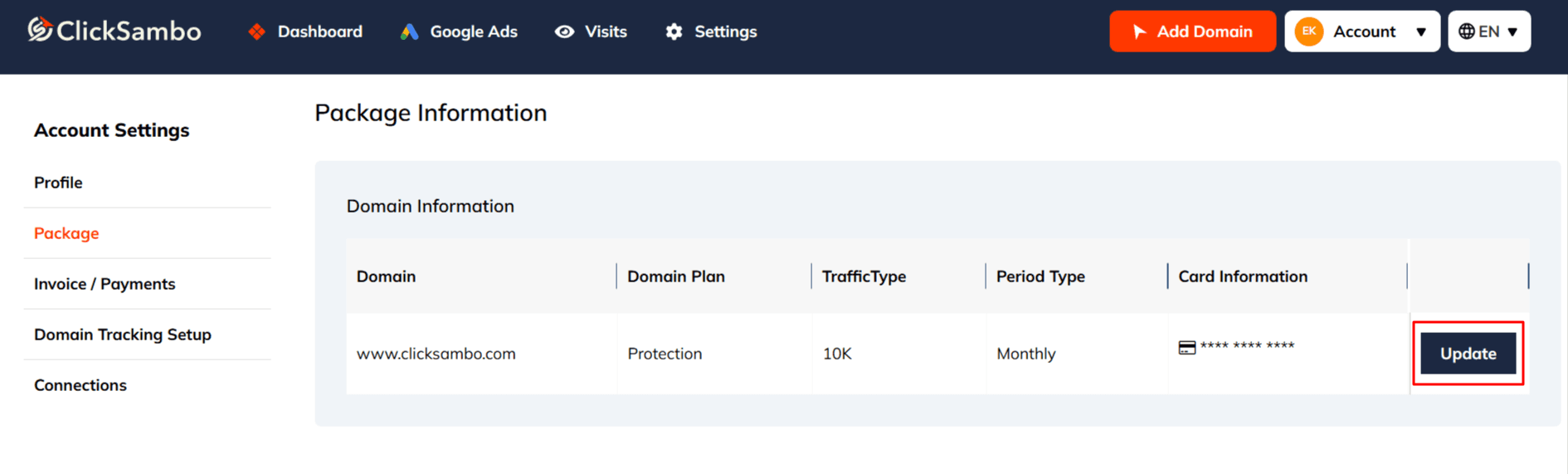
Navigate to Account Settings from the main menu.
Select Package from the menu on the left-hand side.
On the Package Information page, find the specific domain whose plan you want to change.
Click the Update button in that domain's row.
You will be taken to the plan selection page where you can:
Choose a new plan.
Adjust your traffic limits. Switch between monthly and annual billing.
After making your selections, click the Update Package button to confirm the changes.
Your subscription will be updated immediately. Any corresponding changes to your billing will be reflected on your next invoice.


Protect your marketing budget and increase revenue with ClickSambo
Start Trial
Analyze your account and uncover losses caused by fake clicks.
Get Free Report
Reach us easily via WhatsApp, live chat, or email.
Contact Us
Join our partner program and turn ad-fraud protection into a scalable, recurring revenue stream.

 Other Advertisement Analytics Performance


