

 Özellikler
  Endüstri Dikeyleri
  Müşteri Segmentleri
  Dolandırıcılık Türleri
  Kaynak
 Hakkında
  Legal
Legal Destek
Google Ads offline conversion with API implementation is the most critical technical move for performance agencies in 2026. As third-party cookies have officially vanished, the gap between a "Good" agency and a "Market-Leader" is defined by signal integrity. While traditional tracking only focuses on positive outcomes, ClickSambo’s revolutionary approach uses a Google Ads offline conversion with API workflow to feed both primary (positive) and secondary (negative) signals back to Google’s Smart Bidding algorithm. This guide explores how to manually set up this bridge and how ClickSambo automates the process to reclaim up to 50% of your wasted ad spend.
 Özgül Yavuz Kaddoura
Google Ads offline conversion with API: 2026 Setup Guide
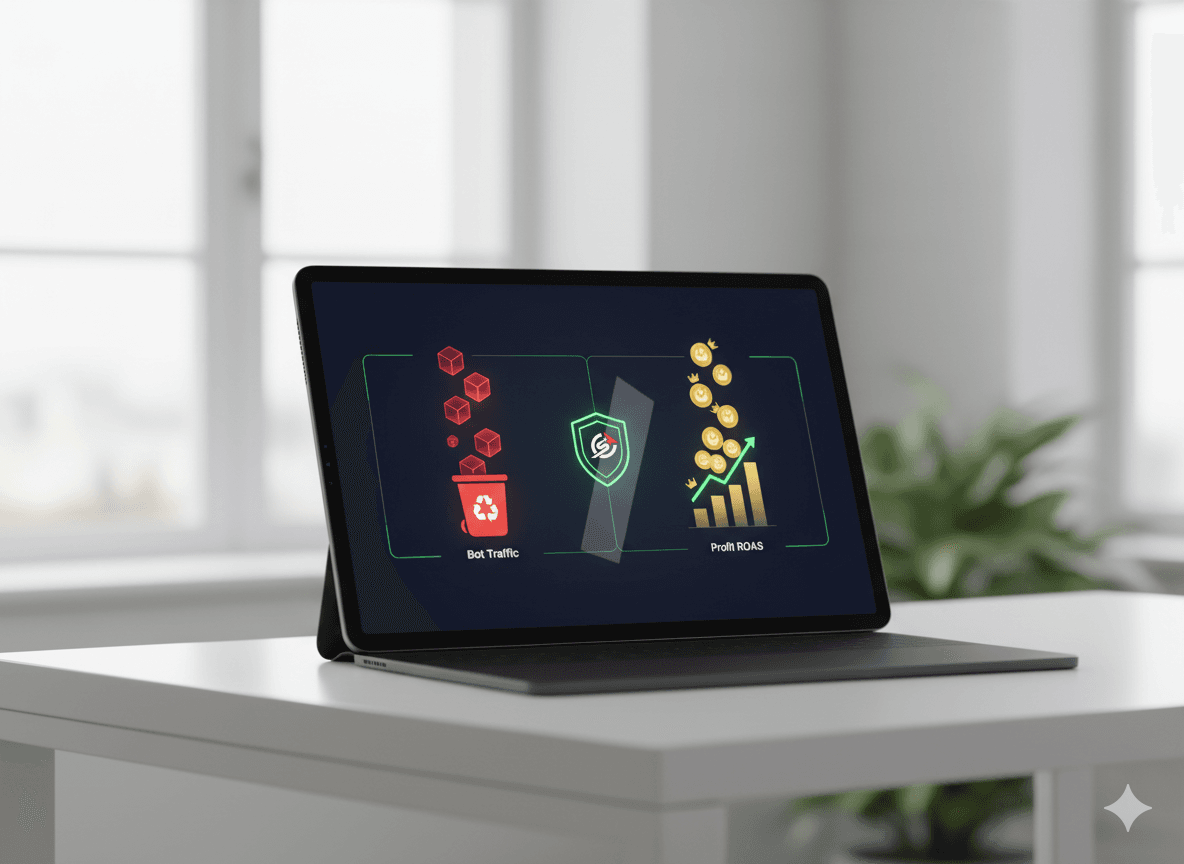
How to Master Detailed Offline Conversion Tracking?
Detailed tracking starts with the GCLID (Google Click ID) or WBRAID/GBRAID for iOS/YouTube traffic. To execute a Google Ads offline conversion with API workflow successfully, you must capture these IDs at the moment of the click and store them in your CRM or data warehouse for at least 90 days.
The success path for 2026:
Capture: Use a lightweight script to pull IDs from the URL and store them in localstorage.
Mapping: Link the Click ID to specific lead stages (e.g., MQL, SQL, Closed-Won) within your CRM.
Feedback: Use the Google Ads offline conversion with API to push the "status change" back to Google. This allows the AI to see the full funnel, not just the initial click.
How to Manually Setup Google Ads offline conversion with API?
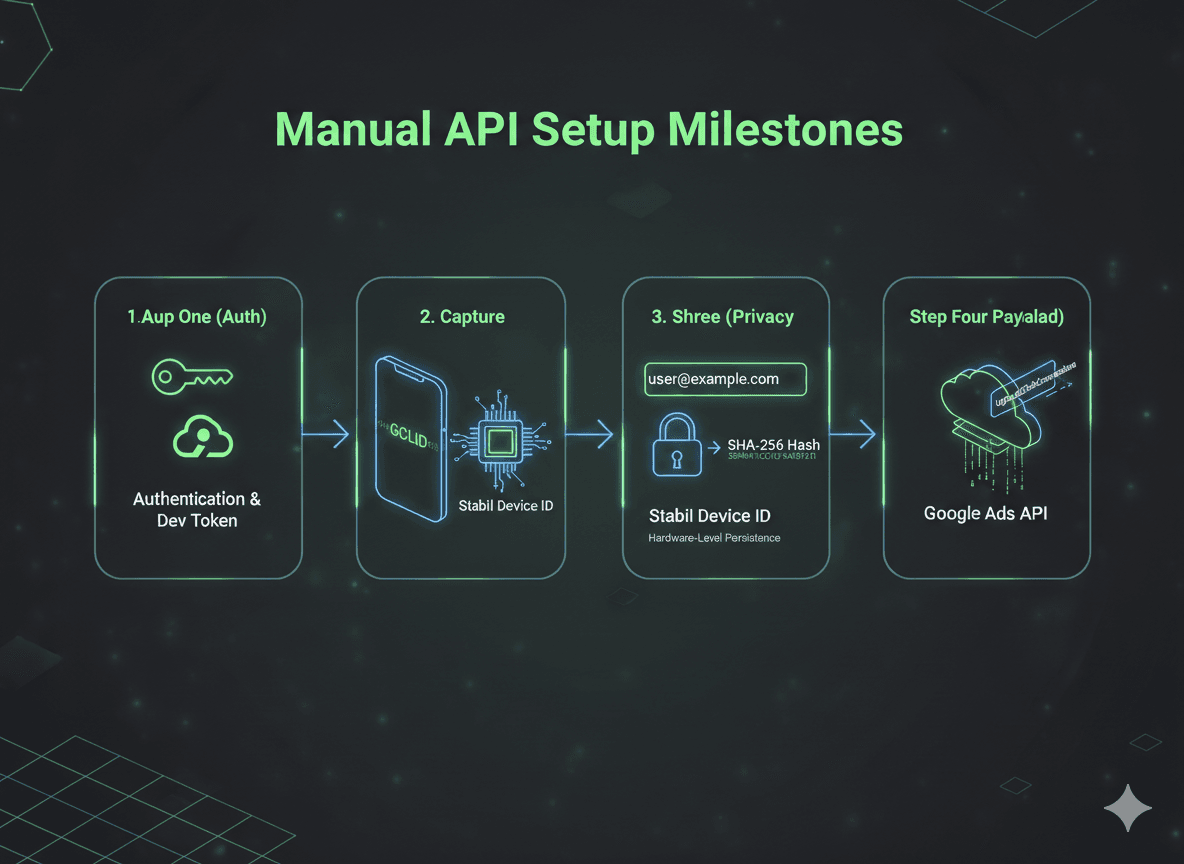
For teams wanting to manage the infrastructure themselves, a manual Google Ads offline conversion with API setup requires deep technical precision. Follow these milestones:
1: Authentication & Dev Token: Create a project in the Google Cloud Console, enable the Google Ads API, and request a Developer Token from your Manager Account (MCC).
2: GCLID & Identity Capture: Your website must capture the GCLID (for Search) or WBRAID/GBRAID (for iOS). ClickSambo’s API integration automatically links these IDs to physical hardware via Stabil Device ID, ensuring the signal persists even if cookies are cleared.
3: Data Hashing (SHA256): To comply with 2026 privacy standards, all user data (email/phone) must be normalized (lowercase, no spaces) and hashed using SHA-256 before the Google Ads offline conversion with API upload.
4: The Payload Construction: Use the UploadClickConversions method. Your payload must include the conversion_action resource name, the click ID, and a conversion_date_time that matches your account's timezone perfectly.
Expert Tricks for Google Ads offline conversion with API Success
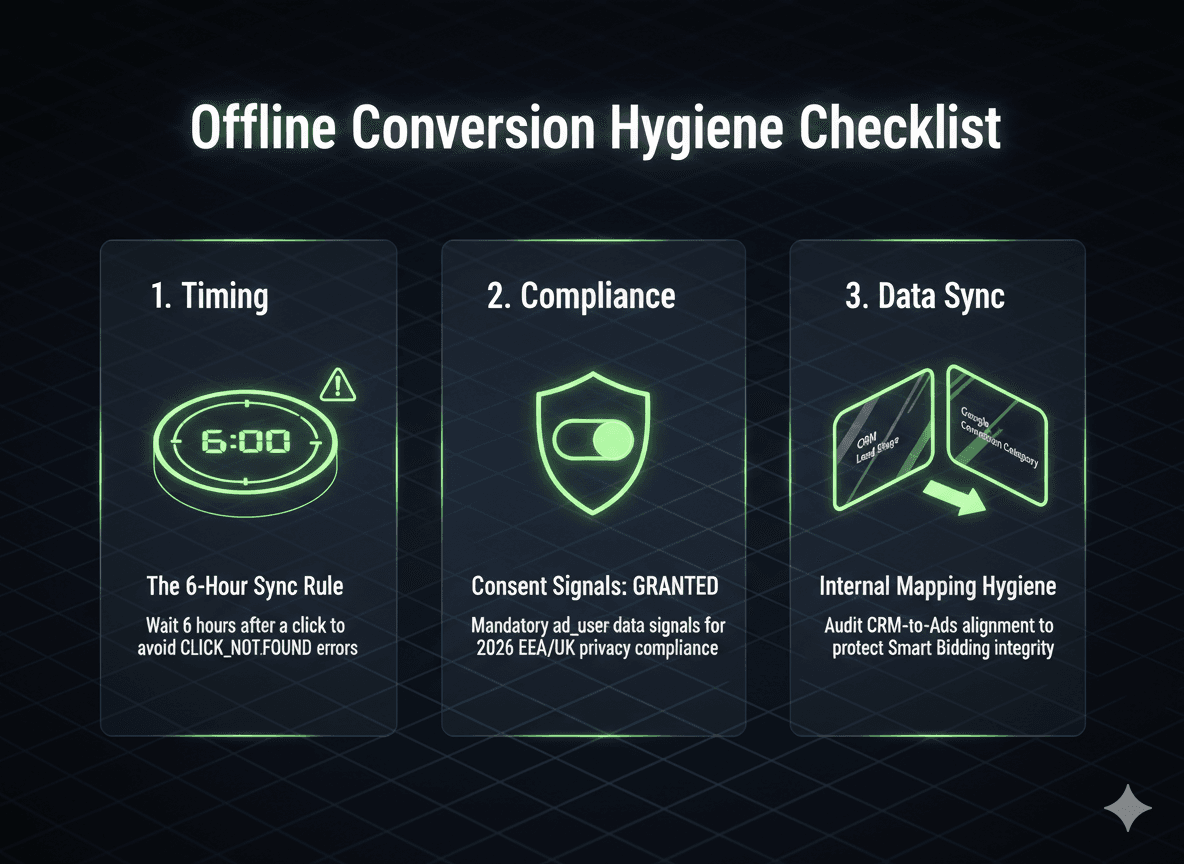
Avoid these common mistakes to keep your Google Ads offline conversion with API healthy:
The 6-Hour Delay: Google needs roughly 6 hours to index a GCLID. Uploading sooner will trigger a CLICK_NOT_FOUND error.
Consent Signals: In 2026, you must pass the consent field (ad_user_data = GRANTED) for EEA users, even for fraud exclusion lists.
Internal Hygiene: Regularly audit your reports to ensure your manual CRM stages match your Google Ads conversion categories.
Implementing Google Ads Offline Conversions
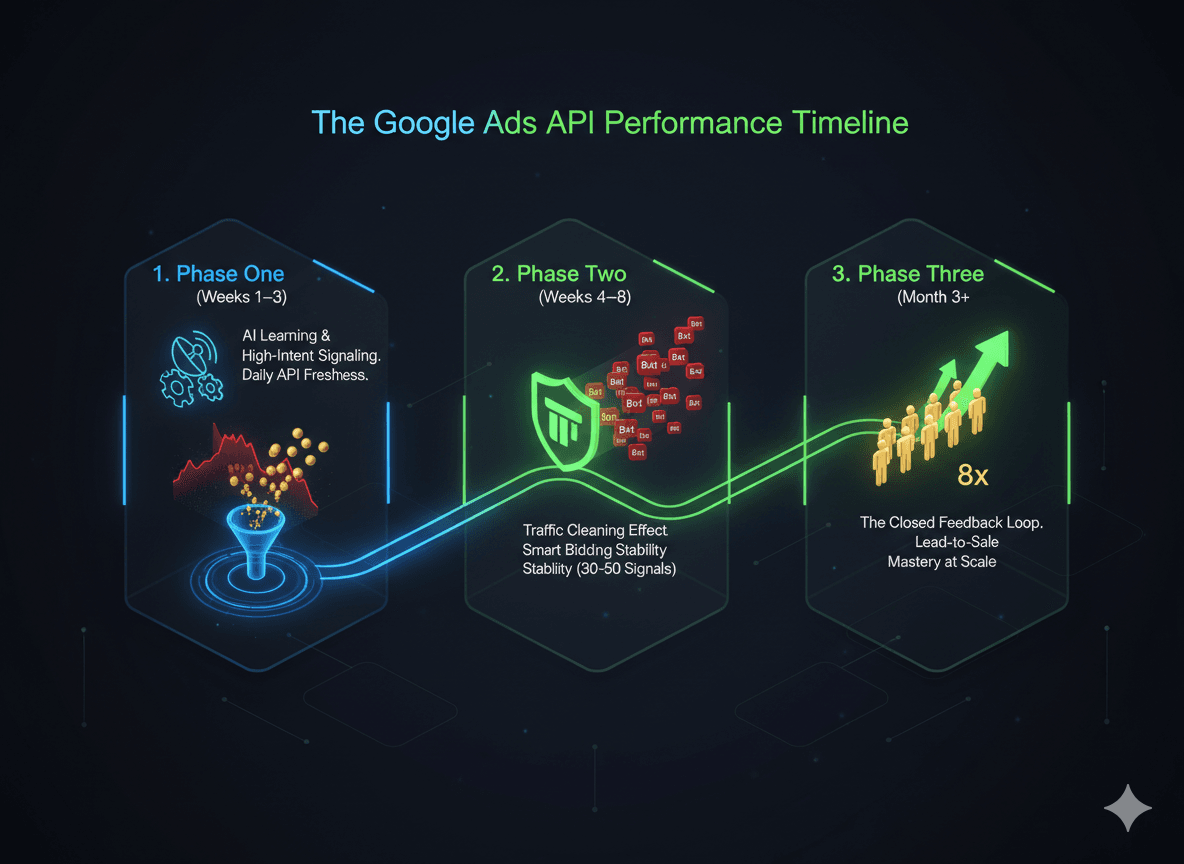
Phase 1: The Calibration (Weeks 1–3)
The AI begins receiving high-intent signals (SQLs, Deals, or Sales) rather than just clicks.
You will likely see a "Learning" status in your account. Expect temporary fluctuations in CPC and CPL as the algorithm tests new placements to find the specific humans that actually move the needle for your sales team.
Ensure data is being pushed via API daily. Freshness is the fuel for the algorithm.
Phase 2: The Stabilization (Weeks 4–8)
Once the account hits a threshold of 30–50 quality signals per month, Smart Bidding begins to stabilize.
This is where the "Traffic Cleaning" effect starts. You’ll notice fewer "garbage leads" (spam/bots) because the AI is no longer rewarded for them. It begins de-prioritizing placements that generate high volume but zero down-funnel value.
Remember that Google attributes sales back to the original click date. Your most recent 7 days may look "thin" while the offline data catches up.
Phase 3: The Scaling (Month 3+)
The feedback loop is now closed. The algorithm understands the profile of your highest-value customer.
This is where the efficiency compounds. While an 8x jump is the "North Star" for elite accounts, most advertisers see a massive lift in Lead-to-Sale efficiency and a significant reduction in wasted ad spend. You aren't just buying more leads; you’re buying the right leads for the same budget.
ClickSambo Automation: Primary vs. Secondary Signal Training
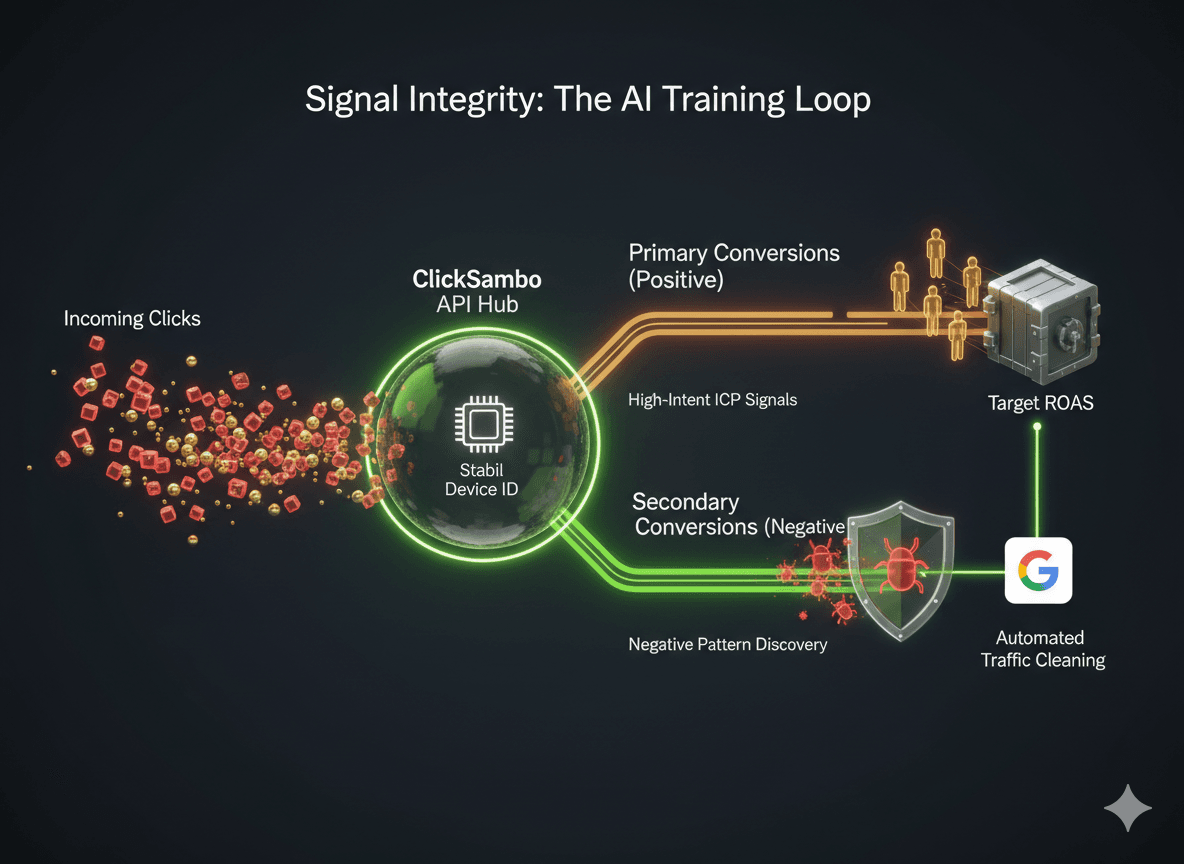
In the 2026 performance marketing landscape, where AI-driven Smart Bidding governs the vast majority of auctions, the most critical lever for agency success is Signal Integrity.
ClickSambo’s automatic Google Ads offline conversion synchronization via direct API integration addresses this by feeding the algorithm a high-fidelity data loop that includes both "wins" and "losses". This dual-layer strategy categorizes interactions into Primary Conversions (Positive Signals)—representing genuine, high-value human actions such as call clicks and qualified leads that define your Ideal Customer Profile (ICP)—and Secondary Conversions (Negative Signals)—which flag sophisticated fraud, bots, and malicious competitor activity identified through our proprietary Stabil Device ID hardware fingerprinting.
By labeling fraudulent traffic as a secondary conversion rather than simply blocking it, you provide the algorithm with a "negative pattern" to avoid. This proactively trains the Smart Bidding model to recognize the specific "DNA" of a bot or low-quality actor without inflating your primary ROI metrics or reported conversions. As the AI learns to associate certain hardware signatures and behavioral patterns with zero-value interactions, it instinctively stops bidding on those specific placements and device profiles in future auctions. This automated "Traffic Cleaning" effect ensures your budget is reserved exclusively for high-intent human prospects, effectively lowering your CPA by up to 50% and allowing your campaigns to scale with unprecedented precision.
Master Google Ads offline conversion with API
Use ClickSambo’s automated Google Ads offline conversion with API workflow
 Start Free Trial
Sıkça sorulan sorular
How does a Google Ads offline conversion with API improve my Smart Bidding?
AI models are only as smart as the data they receive. By utilizing a Google Ads offline conversion with API, you feed the algorithm clean human signals as Primary Conversions and fraud patterns as Secondary Conversions. This "Traffic Cleaning" effect trains the AI to recognize the "DNA" of a bot and stop bidding on those segments, effectively lowering your CPA and stabilizing your ROAS .
Can I use Google Ads offline conversion with API for Performance Max (PMax)?
Absolutely. PMax is a signal-hungry campaign type that often suffers from "Signal Poisoning" due to low-quality display placements. A direct Google Ads offline conversion with API setup prevents PMax from wasting budget on bots by signaling which interactions are actually human-intent events .
What is the "Secondary Conversion" trick in ClickSambo’s API setup?
Most agencies only report "wins." Our Google Ads offline conversion with API feature identifies fraud, bots, and malicious competitors via our(https://clicksambo.com/tr/destek-detay/click-sambo-da-cihaz-kimligi-nedir) and uploads them as a "Secondary Conversion." This provides a "negative pattern" for the AI to avoid in future auctions without inflating your reported conversion metrics .
Why do I get a CLICK_NOT_FOUND error with my Google Ads offline conversion with API?
This is usually a timing issue. Google requires approximately 6 hours to index a click identifier (GCLID) in its system. If you attempt an upload via the Google Ads offline conversion with API too soon, the ID won't be recognized. ClickSambo’s automated bridge manages this delay perfectly to ensure 100% match rates .
Is this manual setup required if I use Google Ads offline conversion with API?
While you can set up a custom bridge through the (https://developers.google.com/google-ads/api/docs/conversions/overview), ClickSambo automates the entire process. We handle the SHA-256 hashing, timezone synchronization, and real-time signal transmission, allowing your team to focus on strategy rather than technical infrastructure .


 Other
Other