
Updated Date:
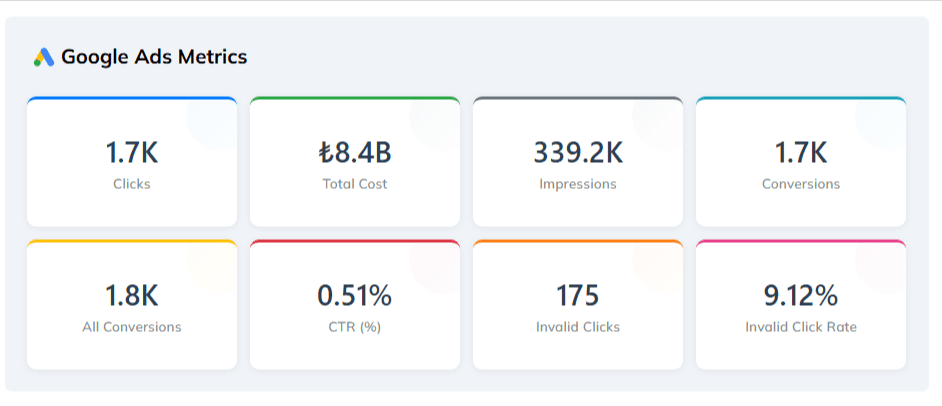
| Clicks | he total volume of ad clicks generated (e.g., 1.7K Clicks). |
| Total Cost | The total spend for the selected period, displayed in your local currency (e.g., ₺8.4B). |
| Impressions | How many times your ads were displayed to users. |
| Conversions & All Conversions | These cards track valuable user actions, helping you measure ROI. |
| CTR (%) | Your Click-Through Rate, indicating how often people who see your ad end up clicking it. |
| Invalid Clicks & Invalid Click Rate | These critical metrics show the volume of fraud detected (e.g., 175 Invalid Clicks) and the percentage of your total traffic that was fraudulent (e.g., 9.12%). |

| Action Type | Lists specific events tracked on your site, such as "Social Media" clicks or starting a "Membership Process". |
| Total Clicks | The total number of times an action was performed. |
| Unique IPs | The number of distinct users (IP addresses) performing the action. |
Tip: If "Total Clicks" is significantly higher than "Unique IPs," it may indicate that a single user (or bot) is spamming a specific button on your site.

Browser Usage chart showing the distribution of browsers (Chrome, Safari, Firefox, etc.). Sudden spikes in unusual or outdated browsers are key indicators for our Bot Traffic Detection system, helping to flag non-human activity before it drains your budget
Fraud by Device bars compare clean versus fraudulent traffic across Desktop, Mobile, and Tablet. Use this to identify if a specific device type is generating disproportionate fraud.
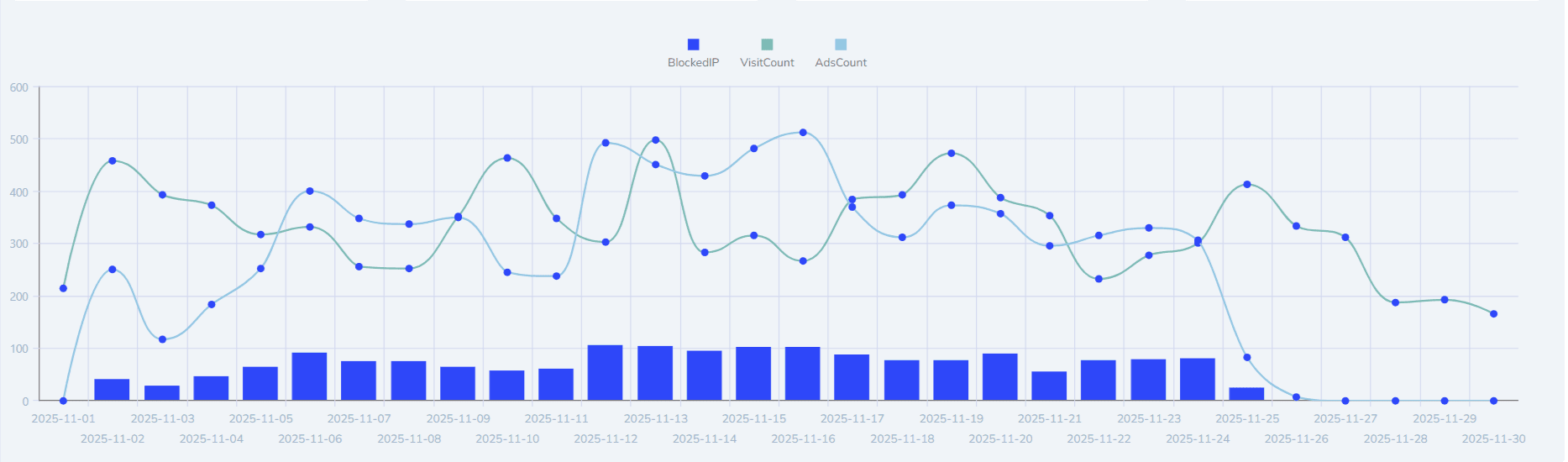
| AdsCount (Total Ad Clicks) | All raw clicks before filtering. |
| VisitCount (Legitimate Visits) | Actual legitimate users. In a healthy campaign, this line should closely track AdsCount. |
| BlockedIP (Blocked IPs) | Bars showing unique fraudulent IPs blocked daily. |
Insight: Spikes in
BlockedIPwithout increases inVisitCountindicate ClickSambo is actively filtering an attack.

| Fraudulent Campaigns | Identifies which specific ad campaigns are being targeted. |
| Fraudulent Countries | A map highlighting the geographical origins of blocked fraud. |
| Fraud Types | Categorizes blocks by reason (e.g., "Data Center," "Known Bot," or "Click Spam"). To learn more about how we identify fraud types, see our guide on Sophisticated Invalid Traffic |

| Ad Clicks vs. Landing Page Views | Compares ad clicks to users who actually loaded the page. Large discrepancies may indicate click spam or slow load times. |
| Blocked Clicks | Total fraudulent clicks prevented from registering as visits. |
| Unique Visits & Page Views | Measures real audience size and engagement depth. |


Protect your marketing budget and increase revenue with ClickSambo
Start Trial
Analyze your account and uncover losses caused by fake clicks.
Get Free Report
Reach us easily via WhatsApp, live chat, or email.
Contact Us
Join our partner program and turn ad-fraud protection into a scalable, recurring revenue stream.

 Other Advertisement Analytics Performance


