
Updated Date:
This is your central command center for Ad Spend Protection and Digital Advertising Analytics. Here, you can monitor your ad traffic, identify Invalid Traffic, and visualize the direct impact of our Ad Fraud Prevention Tools on your ROI.
This guide walks you through each section of the interface to help you maximize your PPC Fraud Protection.

Domain Selector: If you are managing Ad Fraud Protection across multiple websites, select the specific domain to analyze here. The "Protected" status confirms that our Bot Traffic Filtering Solutions are active.
Date Range Selector: Choose the time period to review (e.g., "Today," "Last 7 Days"). The dashboard will instantly update, acting as a real-time PPC Optimisation Tool.

Total Fake Clicks Blocked: The total number of fraudulent clicks identified and stopped by ClickSambo in the selected period.
Fraud Percentage: The percentage of your total ad clicks that were identified as fraudulent.
Your CPC (for Savings): This is the average Cost-Per-Click you've configured in your settings, which is used to calculate your savings.
Estimated Savings: The total ad spend we've saved you by blocking fraudulent clicks from consuming your budget.
Total Ad Clicks: All clicks received from your connected ad platforms.
Unique Visits: The number of actual visitors who landed on your site after the click.
Blocked IPs: The number of unique fraudulent IP addresses blocked by ClickSambo.
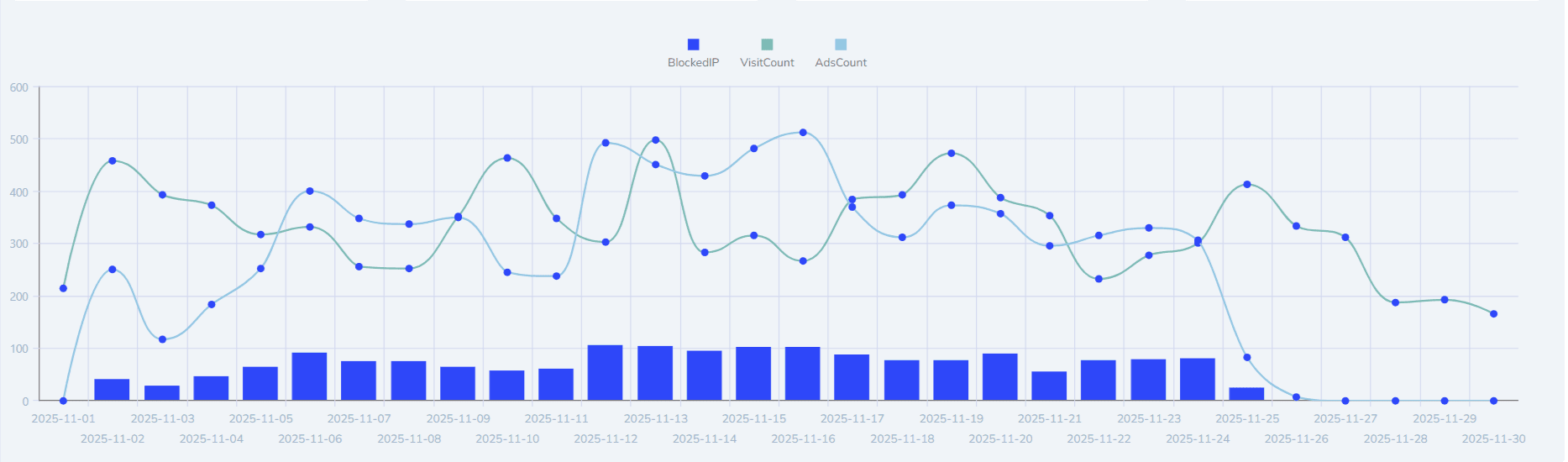
Use this graph to spot sudden spikes in fraudulent activity or to monitor how your traffic trends change over time.
Fraudulent Campaigns: A pie chart that quickly shows you which of your ad campaigns are being targeted the most by invalid traffic.
Fraudulent Countries: An interactive map highlighting the geographical origins of fraudulent clicks.
Fraud Types: A chart breaking down the reasons clicks were blocked (e.g., "Over-Threshold Clicks," "Blacklist," "Fraudelent Behaviour").

Browser & Device Usage: See the breakdown of your legitimate traffic by browser (Chrome, Safari, etc.) and device type (Desktop, Mobile, Tablet).
Core Metrics: Get a quick count of fundamental metrics like Total Clicks, Unique Landing Page Views, and the total number of clicks that were successfully blocked.
For Daily Monitoring: Quickly check your "Estimated Savings" and "Fraud Percentage" to see the immediate value ClickSambo is providing.
For Trend Analysis: Use the main Traffic Trend Graph to spot unusual spikes in blocked activity that might correspond to a new ad campaign or a targeted attack.
For Strategic Optimization: Use the "Fraudulent Campaigns" and "Fraudulent Countries" widgets to identify low-quality traffic sources and potentially refine your ad targeting to avoid them.


Protect your marketing budget and increase revenue with ClickSambo
Start Trial
Analyze your account and uncover losses caused by fake clicks.
Get Free Report
Reach us easily via WhatsApp, live chat, or email.
Contact Us
Join our partner program and turn ad-fraud protection into a scalable, recurring revenue stream.

 Other Advertisement Analytics Performance


