
Updated Date:
Conversion Tracking is a powerful feature in ClickSambo designed to bridge the gap between click fraud protection and Google Ads optimization. By communicating directly with your Google Ads account, ClickSambo helps refine your campaign data, leading to more efficient spending and better performance.
Go-to-Settings-->Domain Settings page
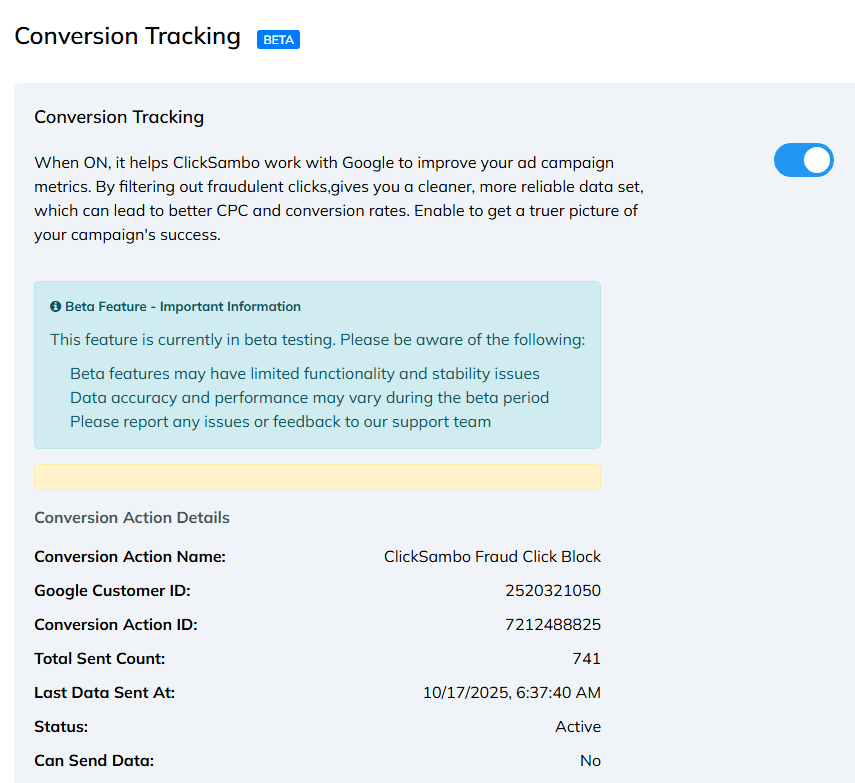
When enabled, ClickSambo identifies fraudulent or invalid clicks and sends this data back to Google Ads as a specific conversion action. This process "cleans" your campaign metrics by helping Google’s algorithms understand which clicks are low-quality.
Initial Sync: Once you toggle this feature ON, please allow 4 to 8 hours for the initial data sync to occur. It takes this time for the system to establish the handshake with Google and begin transmitting data.
Refresh Frequency: To ensure data stability and comply with API efficiency, ClickSambo batches data. The "Total Sent Count" and Google Ads metrics will refresh every time a new batch of 100 conversions has been generated.
Once the conversion action "ClickSambo Fraud Click Block" appears in your Google Ads account, you must ensure its Optimization Goal is set to "Secondary.
Why Secondary? This action tracks blocked fraud attempts, not sales or leads. If set to "Primary," Google’s Smart Bidding might mistakenly try to increase these clicks to "optimize" your campaign.
The Benefit: By setting it to Secondary, the data will not interfere with your bidding strategies, but you can still view the fraud data in your "All Conversions" reporting column.
| Field | Description |
| Conversion Action Name | The name of the event in your Google Ads "Conversions" list (default: ClickSambo Fraud Click Block). |
| Google Customer ID | The unique 10-digit ID of the Google Ads account currently linked. |
| Conversion Action ID | The specific identifier for the tracking tag created by ClickSambo. |
| Total Sent Count | The total number of fraudulent signals reported. This updates in increments of 100. |
| Last Data Sent At | The timestamp of the most recent data batch sync. |
| Status | Indicates if the tracking action is currently Active or Inactive. |
| Can Send Data | Shows whether ClickSambo has the necessary permissions to transmit data to Google. |
Cleaner Data: Filters out "noise" from bot traffic and fraudulent clicks in your reporting.
Improved Optimization: Helps Google’s Smart Bidding focus on real, high-intent users rather than bots.
Better ROI: Leads to a lower Cost Per Click (CPC) and higher conversion rates over time as the algorithm learns to avoid invalid traffic.
Stability: You may encounter limited functionality or occasional stability issues.
Data Accuracy: Performance and data reporting may vary during this period.
Feedback: If you notice discrepancies or have suggestions, please reach out to our support team.
Check Permissions: Ensure ClickSambo still has "Standard" or "Admin" access to your Google Ads account.
Conversion Action: Ensure the ClickSambo Fraud Click Block action has not been deleted or renamed within your Google Ads dashboard.
Sync Delay: Remember that data only pushes to Google after the 100-conversion threshold is met.


Protect your marketing budget and increase revenue with ClickSambo
Start Trial
Analyze your account and uncover losses caused by fake clicks.
Get Free Report
Reach us easily via WhatsApp, live chat, or email.
Contact Us
Join our partner program and turn ad-fraud protection into a scalable, recurring revenue stream.

 Other Advertisement Analytics Performance


