
 Features
  Industry Verticals
  Customer Segments
  Fraud Types
  Resource
 About
About  Legal
Legal Support

 Özgül Yavuz Kaddoura
Updated Date:
Google Ads Refund Guide
Get your money back from Google Ads! This guide will help you get a refund. Protect your advertising budget and get reimbursed for expenses incurred from fraudulent clicks. By implementing professional PPC Fraud Protection, you can gather the data required to prove Sophisticated Invalid Traffic and secure your reimbursement.
How to Identify Invalid Clicks and Reclaim Your Budget
For many digital advertisers, the realization comes slowly: your budget is draining, clicks are high, but conversions are zero. You are paying for traffic, but you aren't getting customers. If this sounds familiar, you might be a victim of invalid traffic. The good news is that Google has a mechanism for this. You can request a refund for wasted ad spend, but the burden of providing forensic proof lies with the advertiser.
This comprehensive guide will walk you through exactly how to identify suspicious activity, how to gather evidence against competitor click fraud, and the specific steps to file a successful claim.
Understanding the "Silent" Budget Drain

Google Ads operates on a pay-per-click model. In theory, this is fair. In practice, it is vulnerable to abuse. Competitor's ad click fraud is a major issue where rivals maliciously click your ads to exhaust your daily budget. Bots and click farms also contribute to the noise.
Google does have automated filters that catch simple invalid clicks. When they catch them, they credit your account automatically. However, sophisticated fraud often bypasses these initial filters. To catch the advanced threats, you need to be proactive. You need to look beyond the basic metrics and start digging for the truth.
The Technical Hurdle: GIVT vs. SIVT

To win a refund, you must understand how Google classifies traffic. General Invalid Traffic (GIVT) consists of simple bots and crawlers that Google catches easily. However, the clicks that drain your budget are usually Sophisticated Invalid Traffic (SIVT). These are AI-driven bots that mimic human scrolling and mouse movements. Google’s automated filters often miss SIVT, which is why manual claims backed by forensic data are the only way to recover these specific losses.
Step 1: Diagnosing the Problem in Google Ads
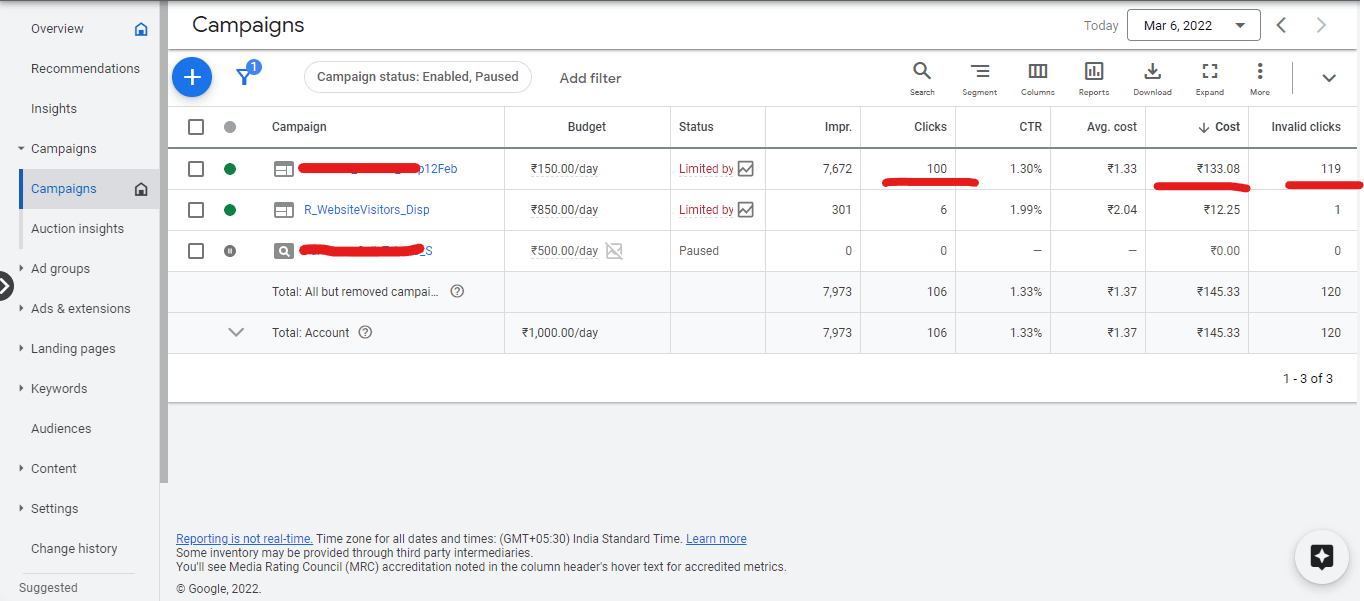
The first step to getting a refund is confirming that you have a problem.
How to Reveal Invalid Clicks:
Log in to your Google Ads dashboard.
Go to the Campaigns tab.
Click the Columns icon and select Modify Columns.
Under the Performance section, check the boxes for Invalid Clicks and Invalid Click Rate. Click Apply.
Now, look at your dashboard again. You will see a new column showing how many clicks Google has already filtered out. If you see a high number here, it means your industry is being targeted. However, this number only represents what Google caught. If your conversion rate is still abnormally low despite these filters, it is highly likely that bot traffic is still leaking through.
The Long-Term Damage: Algorithm Poisoning
Competitor fraud doesn't just steal your cash; it ruins your Smart Bidding. When competitors click your ads and bounce, Google’s AI learns that your "ideal" visitors don't convert. This pushes your ads down in the rankings and raises your CPC. A refund recovers your money, but proactive blocking recovers your account's intelligence.
Step 2: Identifying Competitor Click Fraud

Competitor click fraud is more common than most businesses admit. It happens when a rival business manually clicks your ads or hires a "click farm" to do it for them. The goal is simple: force you to spend your budget so their ads can show up cheaper.
Signs of Competitor's Fraud:
| High Bounce Rate | Visitors land on your site and leave immediately (within seconds). |
| Repeated IPs | You see multiple clicks from the same IP address or the same geographic location (e.g., the city where your competitor is based). |
| No Conversions | A sudden spike in traffic with zero leads often signals click fraud. |
Google's automated systems struggle to catch click fraud because if the attacker spaces out their clicks or uses different devices, they look like legitimate users. This is where manual investigation fails and where you need professional help.
Step 3: The Role of Click Fraud Prevention Tools

To get a refund, you cannot just tell Google "I think my clicks are fake." You need hard evidence.
Ad fraud prevention tools act as a surveillance system for your ads. They record every single interaction—IP address, device ID, screen resolution, and mouse movement.
If you suspect foul play, prevention tools can generate a "Refund Report." This report lists the exact IP addresses that clicked your ads suspiciously. It provides timestamps and user agent strings. Without data from click fraud prevention tools, your refund request is likely to be rejected for "insufficient evidence."
What Counts as "Forensic Evidence"? When filing a claim, Google looks for more than just an IP list. You need to provide:
| User Agent Strings | The browser and OS details of the attacker. |
| Time-to-Click (TTC) | Proof that the click happened too fast for a human to read the ad. |
| Session Depth | Data showing the visitor didn't even wait for the page to render. |
ClickSambo automates this data collection, turning raw logs into a "Google-Ready" PDF report.
Step 4: How to Submit a Refund Request (The Click Quality Form)
Once you have gathered your evidence (either manually or via click fraud prevention tools), you are ready to file a claim. You must use Google's Official Click Quality Form.
Information you will need:
| Customer ID | Found in the top corner of your Google Ads account |
| Dates of Suspicious Activity | Be specific. Google will only investigate the last 60 days. |
| Campaign Names | List the specific campaigns targeted by click fraud. |
| GCLID Values | If possible, provide the Google Click IDs for the bad clicks. |
| The Evidence | This is crucial. Upload the web server logs or the export from your fraud protection tools showing the malicious IPs. |
Writing the Summary: In the form's summary section, be concise. "I observed a 300% spike in traffic from [Location] with a 100% bounce rate.
Timing Your Claim: The 60-Day Window
Google strictly enforces a 60-day limit for investigation requests. If you notice a spike from 3 months ago, it is likely too late. We recommend performing a Traffic Audit every 30 days. This ensures that your evidence is fresh and within Google’s "statute of limitations" for credits.
To see if Google has already credited you, compare your Served Cost vs. Billed Cost in your billing reports. If Billed is lower than Served, Google caught the fraud automatically. If they are equal, it's time to file a manual refund request.
Quick Check: Did Google Already Refund You? Before filing, check your "Billing & Invoices" tab.
| Served Cost | What the clicks actually cost in real-time. |
| Billed Cost | What you were actually charged. |
| The Math | If the Served Cost > Billed Cost, Google’s automated filters already caught some fraud. Your manual claim targets the remaining gap where Billed Cost still includes SIVT. |
Step 5: Implementing Long-Term PPC Fraud Protection

Getting a refund is great, but preventing the loss is better. Relying on refunds is a slow process; investigations can take weeks. You need a strategy for proactive PPC fraud protection.
PPC fraud protection is about stopping the click before you are charged. While Google refunds you after the fact, specialized software can block the bad IP address in real-time.
IP Blocking: PPC fraud protection suites automatically add malicious IPs to your Google Ads exclusion list.
Geofencing: If you only service London, but your ads get clicks from Russia, PPC fraud protection rules can automatically block those regions.
Device Fingerprinting: Advanced PPC fraud protection can identify the same attacker even if they switch IP addresses, ensuring your budget stays safe.
Step 6: Monitoring and Maintenance

Fraud is not a one-time event; it is an ongoing battle. You should make it a habit to check the "Invalid Clicks" column in your Google Ads dashboard weekly.
If you see a sudden drop in ROAS (Return on Ad Spend), do not assume your ads are bad. Use your click fraud prevention tools to audit the traffic quality. If the tool flags a surge in bot activity, update your exclusion lists immediately.

Billions Lost to Fraud
Global ad fraud, including invalid clicks, costs billions yearly.
Mobile Ads Vulnerable
A large portion of mobile ad spend is lost to fraud.
Prevention Saves Money
Ad fraud prevention can save billions annually.
Bots Cause Significant Issues
Malicious bots are a major source of invalid clicks.Google requires forensic proof to process refunds. Generate automated reports formatted for the Click Quality team.
 Case Study for a Google Refund
Frequently asked questions
By default, Google Ads does not show invalid click data in your main dashboard. To reveal this data, you must manually modify your campaign columns:
Navigate to the Campaigns tab in your Google Ads dashboard.
Click the Columns icon and select Modify Columns.
Under the Performance section, check the boxes for Invalid Clicks and Invalid Click Rate.
Click Apply to see exactly how much traffic Google has already identified as non-genuine
If your conversion rate remains low despite Google's automated filters, look for these specific patterns in your traffic logs:
Anomalous CTR Spikes: A sudden jump in click-through rates without a corresponding increase in sales or leads.
Extreme Bounce Rates: High volumes of visitors who leave your site within one second of landing.
Geographic Clustering: A surge of clicks originating from a specific city or region that does not match your target customer base.
Repetitive IP Addresses: Multiple clicks from the same IP address or subnet over a short period.
The Form: Use the official Google Ads Click Quality Form.
Timeline: Google will only investigate activity that occurred within the last 60 days.
Required Data: You must provide your Customer ID, the specific Campaign Names, and the Dates of Suspicious Activity.
Hard Evidence: Google rarely grants refunds based on circumstantial evidence alone. You should attach web server logs or reports from click fraud prevention tools that list specific malicious IP addresses and timestamps.
While Google’s systems catch many simple bot clicks, they are often reactive—crediting your account only after the damage is done.
Real-Time Blocking: Specialized PPC fraud protection software identifies and blocks malicious IPs in real-time before they can click your ads again.
Advanced Detection: Third-party tools use device fingerprinting and behavioral analysis to catch sophisticated bots that use VPNs or proxies to mimic human behavior.
Forensic Evidence: These tools provide the detailed forensic logs (including mouse movements and browser data) that are necessary to win a manual refund claim with Google.




 Other
Other